キャラクター一貫性
このモジュールで学ぶこと
- Character DNA Workflowでキャラクターを確立する方法
- キャラクターシート(アンカー画像)の生成
- 参照画像チェーンによる一貫性維持
- 連続マンガパネルの生成
学習目標
このモジュールを終えると、以下のことができるようになります:
- キャラクターシートを生成し、アンカー画像として使用できる
- 参照画像を使って同じキャラクターを別シーンに配置できる
- 複数パネルのマンガで一貫したキャラクターを維持できる
- 4コママンガを一度に生成できる
目次
- 事前準備
- セクション1: Character DNA Workflow
- セクション2: キャラクターシート生成
- セクション3: 参照画像チェーン
- セクション4: 連続マンガパネル生成
- セクション5: 4コママンガ生成
- トラブルシューティング
- まとめ
- よくある質問
事前準備
必要なもの
- 環境構築で構築した環境
- プロンプトエンジニアリング基礎で学んだプロンプト技術
スクリプトの更新
このモジュールでは参照画像を使用した画像生成を行います。既存のスクリプトに generate_with_reference 関数を追加します。
C:\nanobanana\generate_image.py を以下の内容で上書きしてください:
import os
import sys
from datetime import datetime
from dotenv import load_dotenv
from google import genai
from google.genai import types
from PIL import Image
import io

def generate_image(prompt, output_filename=None, aspect_ratio="1:1"):
    """プロンプトから画像を生成する

    Args:
        prompt: 画像生成プロンプト
        output_filename: 出力ファイル名(省略時はタイムスタンプ)
        aspect_ratio: アスペクト比("1:1", "16:9", "9:16", "3:4", "4:3")
    """

    load_dotenv()
    client = genai.Client(api_key=os.getenv("GOOGLE_API_KEY"))

    print(f"プロンプト: {prompt[:50]}..." if len(prompt) > 50 else f"プロンプト: {prompt}")
    print("生成中...")

    response = client.models.generate_content(
        model="gemini-2.5-flash-image",
        contents=prompt,
        config=types.GenerateContentConfig(
            response_modalities=['IMAGE'],
            image_config=types.ImageConfig(aspect_ratio=aspect_ratio)
        )
    )

    for part in response.candidates[0].content.parts:
        if hasattr(part, 'inline_data'):
            image = Image.open(io.BytesIO(part.inline_data.data))
            if output_filename is None:
                output_filename = f"generated_{datetime.now().strftime('%Y%m%d_%H%M%S')}.png"
            image.save(output_filename)
            print(f"画像を保存しました: {output_filename}")
            return image
    return None

def generate_with_reference(prompt, reference_images, output_filename=None, aspect_ratio="1:1"):
    """参照画像を使用して画像を生成する

    Args:
        prompt: 画像生成プロンプト
        reference_images: ファイルパスのリスト(例: ["anchor.png", "panel1.png"])
        output_filename: 出力ファイル名(省略時はタイムスタンプ)
        aspect_ratio: アスペクト比
    """

    load_dotenv()
    client = genai.Client(api_key=os.getenv("GOOGLE_API_KEY"))

    # 参照画像を読み込み
    images = []
    for ref in reference_images:
        if isinstance(ref, str):
            if not os.path.exists(ref):
                print(f"エラー: 参照画像 '{ref}' が見つかりません。")
                print(f"ヒント: まずアンカー画像を生成してください。例:")
                print(f"  python generate_image.py \"Character sheet of ...\" anchor.png")
                return None
            images.append(Image.open(ref))
        else:
            images.append(ref)

    print(f"プロンプト: {prompt[:50]}..." if len(prompt) > 50 else f"プロンプト: {prompt}")
    print(f"参照画像: {len(images)}枚")
    print("生成中...")

    # contentsを構築(プロンプト + 画像)
    contents = [prompt] + images

    response = client.models.generate_content(
        model="gemini-2.5-flash-image",
        contents=contents,
        config=types.GenerateContentConfig(
            response_modalities=['IMAGE'],
            image_config=types.ImageConfig(aspect_ratio=aspect_ratio)
        )
    )

    for part in response.candidates[0].content.parts:
        if hasattr(part, 'inline_data'):
            image = Image.open(io.BytesIO(part.inline_data.data))
            if output_filename is None:
                output_filename = f"generated_{datetime.now().strftime('%Y%m%d_%H%M%S')}.png"
            image.save(output_filename)
            print(f"画像を保存しました: {output_filename}")
            return image
    return None

if __name__ == "__main__":
    if len(sys.argv) < 2:
        print("使い方:")
        print("  テキストのみ: python generate_image.py \"プロンプト\" [出力ファイル名] [アスペクト比]")
        print("  参照画像あり: python generate_image.py \"プロンプト\" --ref 参照画像1.png [参照画像2.png ...] [--out 出力ファイル名] [--ratio アスペクト比]")
        print("")
        print("例:")
        print("  python generate_image.py \"A cute cat\" cat.png")
        print("  python generate_image.py \"Same character in a new scene\" --ref anchor.png panel1.png --out panel2.png --ratio 3:4")
        sys.exit(1)

    prompt = sys.argv[1]

    # --ref オプションがあるか確認
    if "--ref" in sys.argv:
        ref_index = sys.argv.index("--ref")

        # 参照画像を収集
        reference_images = []
        for i in range(ref_index + 1, len(sys.argv)):
            if sys.argv[i].startswith("--"):
                break
            reference_images.append(sys.argv[i])

        # オプション解析
        output = None
        ratio = "1:1"
        if "--out" in sys.argv:
            output = sys.argv[sys.argv.index("--out") + 1]
        if "--ratio" in sys.argv:
            ratio = sys.argv[sys.argv.index("--ratio") + 1]

        generate_with_reference(prompt, reference_images, output, ratio)
    else:
        # 従来のテキストのみ生成
        output = sys.argv[2] if len(sys.argv) > 2 else None
        ratio = sys.argv[3] if len(sys.argv) > 3 else "1:1"
        generate_image(prompt, output, ratio)
使い方(PowerShell、Git Bash共通)
テキストのみで生成(従来と同じ):
python generate_image.py "A cute cat" cat.png
参照画像を使用して生成(新機能):
# アンカー画像1枚を参照
python generate_image.py "Same character in a new scene" --ref anchor.png --out panel1.png

# 複数の参照画像を使用
python generate_image.py "Continuing the story" --ref anchor.png panel1.png --out panel2.png --ratio 3:4
動作確認
更新が完了したら、引数なしでスクリプトを実行してヘルプを確認しましょう:
python generate_image.py
以下のようなヘルプが表示されれば成功です:
使い方:
  テキストのみ: python generate_image.py "プロンプト" [出力ファイル名] [アスペクト比]
  参照画像あり: python generate_image.py "プロンプト" --ref 参照画像1.png [参照画像2.png ...] [--out 出力ファイル名] [--ratio アスペクト比]

例:
  python generate_image.py "A cute cat" cat.png
  python generate_image.py "Same character in a new scene" --ref anchor.png panel1.png --out panel2.png --ratio 3:4
注意: 参照画像を使う例(
--ref anchor.png)は、セクション2以降でアンカー画像を作成してから使用します。今は実行しないでください。
チェックポイント
-
generate_image.pyを更新した -
python generate_image.pyでヘルプが表示される
セクション1: Character DNA Workflow
1-1. なぜキャラクター一貫性が重要か
複数の画像で同じキャラクターを生成すると、「Face Drift(顔のずれ)」が発生します。
- 髪の色が微妙に変わる
- 目の形が異なる
- 服装のディテールが変わる
これを防ぐのが「Character DNA Workflow」です。
1-2. 4ステップのワークフロー
Step 1: アンカーシート生成
        「A close up portrait on the left and a full body view on the right」
        → 顔詳細 + 全身デザインを1枚で
        ↓
Step 2: 参照画像として使用
        新シーン生成時に画像をアップロード
        ↓
Step 3: 明示的な参照
        「featuring the same character shown in the reference image」
        ↓
Step 4: 特徴のロックイン
        重要な特徴(目の色、髪型、特徴的なマーク)を繰り返し指定
1-3. 5-Image Rule(Gemini 3 Pro向け)
Nano Banana Pro(Gemini 3 Pro)は最大14枚の参照画像をサポートしますが、5枚がスタイル破損なしのスイートスポットです。
| モデル | 参照画像上限 | 推奨枚数 |
|---|---|---|
| Nano Banana (Gemini 2.5 Flash) | 3枚 | 1-3枚 |
| Nano Banana Pro (Gemini 3 Pro) | 14枚 | 5枚 |
チェックポイント
- Character DNA Workflowの4ステップを理解した
- 5-Image Ruleを理解した
セクション2: キャラクターシート生成
2-1. 基本テンプレート
キャラクターシートを生成するための基本テンプレートです。[角括弧] の部分を置き換えて使います。
Create a character sheet of [CHARACTER_NAME]:
4 angles (front, 3/4, side, back),
consistent facial features and outfit;
flat neutral background;
even soft lighting;
label panels [blank labels only].
各行の意味:
| 行 | 意味 | 例 |
|---|---|---|
[CHARACTER_NAME] | キャラクター名と簡単な説明 | Yuki, a young anime girl |
4 angles | 複数アングルを1枚に配置 | front, 3/4, side, back |
consistent facial features and outfit | 顔と服装の一貫性を保つ指示 | - |
flat neutral background | 無地の背景(キャラに集中) | gray, white など |
even soft lighting | 均一な照明(影のムラを防ぐ) | - |
label panels | パネルにラベル(省略可) | blank = ラベルなし |
このテンプレートにキャラクターの詳細(髪の色、目の色、服装など)を追加して使います。
2-2. 実践:基本キャラクターシート
基本テンプレートを使って、アニメ風のキャラクターシートを生成してみましょう。
このキャラクターシートはアンカー画像として使用します。セクション3以降で参照画像として活用し、別のシーンでも同じキャラクターを維持できるようになります。
意図:
| 要素 | 内容 |
|---|---|
| キャラクター | 16歳のアニメ風女の子(Yuki) |
| アングル | 正面、3/4、横、背面の4つ |
| 特徴 | 銀髪(ウェーブ)、紫の目、左目下にほくろ |
| 服装 | 紺のセーラー服、白い襟、赤いリボン |
| スタイル | クリーンな線画、アニメ風 |
プロンプト:
Create a character sheet of Yuki, a young anime girl:
4 angles (front, 3/4, side, back view),
consistent facial features and outfit.

Character details:
- Age: 16 years old
- Long silver hair with a slight wave reaching her waist
- Large violet eyes with a gentle expression
- Fair skin with a small beauty mark under her left eye
- Wearing a dark blue school uniform with white sailor collar
- Red ribbon bow tie
- Black knee-high socks and brown loafers

Flat neutral gray background.
Even soft lighting from the front.
Clean line art, anime style.
クリックしてPythonコマンドを生成
生成例:
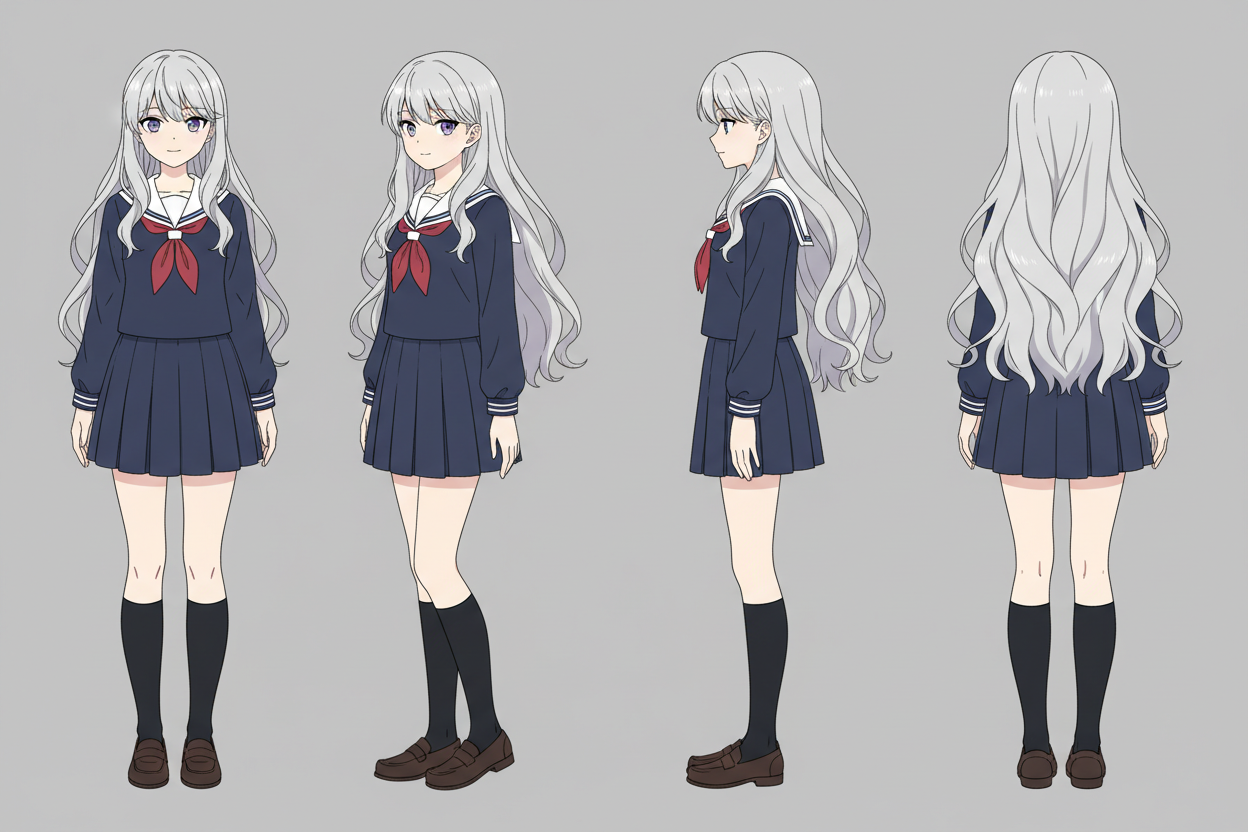
確認ポイント:
- 各アングルで顔の特徴(銀髪、紫の目、左目下のほくろ)が一貫しているか
- 服装(紺のセーラー服、赤いリボン)が全アングルで同じか
- 背景が無地のグレーになっているか
ヒント: うまくいかない場合は、プロンプトの
4 anglesをfront view and side viewに減らしてシンプルにしてみましょう。
2-3. アニメキャラクター(詳細版)
エルフの女騎士という、より詳細なキャラクターシートを生成してみましょう。ファンタジー系のキャラクターでは装備やアクセサリの一貫性が重要です。
意図:
| 要素 | 内容 |
|---|---|
| キャラクター | エルフの女騎士 |
| アングル | 正面、横、背面の3つ |
| 特徴 | 銀の編み込み髪、尖った耳 |
| 装備 | 銀の鎧(金の装飾)、青いマント、レイピア |
| スタイル | フラットカラー、クリーンな線画 |
プロンプト:
Anime character reference sheet, front view, side view, and back view of
a female elven knight. She has long silver braided hair and sharp pointed ears,
wearing polished silver plate armor with gold filigree and a blue cape,
holding a rapier. Flat colors, white background, detailed accessories,
clean line art.
クリックしてPythonコマンドを生成
生成例:
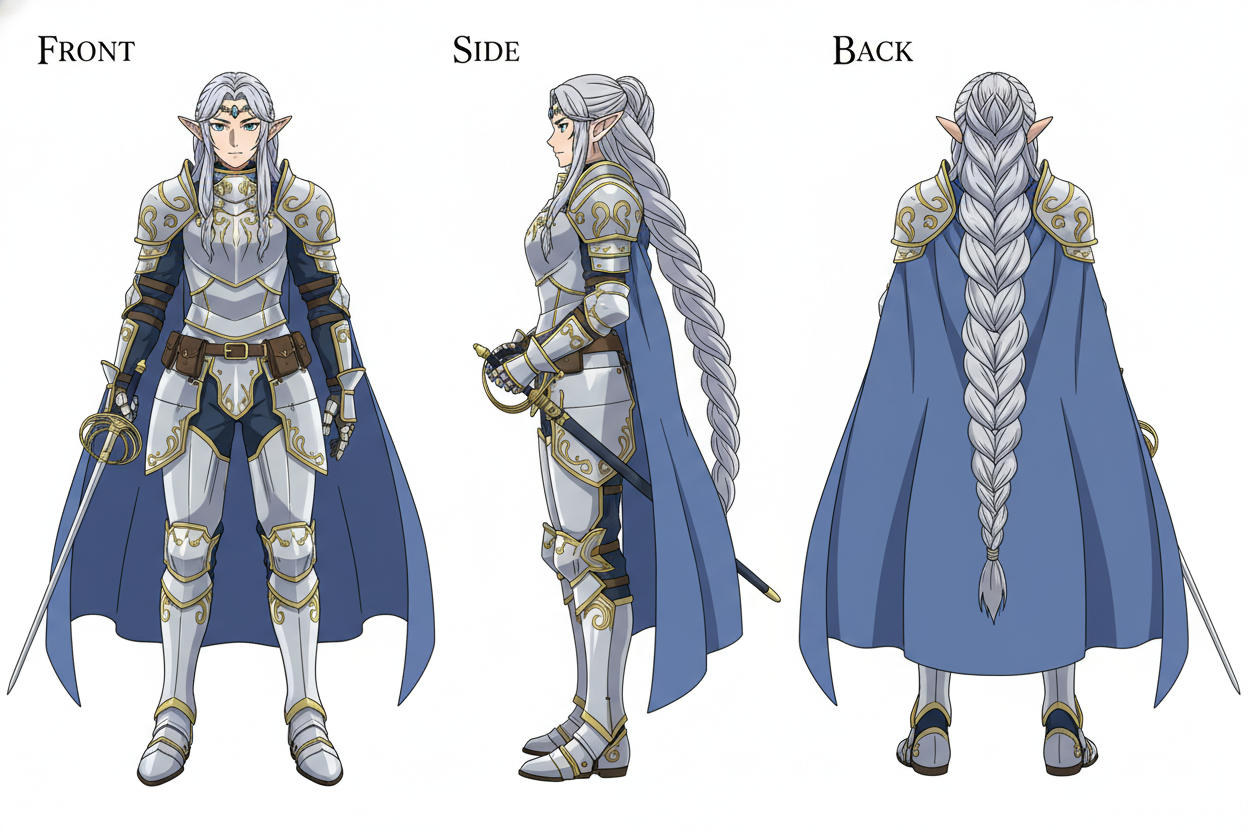
確認ポイント:
- 尖った耳がすべてのアングルで描かれているか
- 鎧のデザイン(銀+金の装飾)が一貫しているか
- 青いマントの形状と長さが統一されているか
2-4. 3Dスタイル(Pixar/Disney風)
Pixar/Disney風の3Dアニメーションスタイルでキャラクターシートを生成します。このスタイルはマスコットキャラクターや子供向けコンテンツに適しています。
意図:
| 要素 | 内容 |
|---|---|
| キャラクター | フレンドリーなロボットコンパニオン |
| スタイル | Pixar/Disney風3Dアニメーション |
| アングル | 正面、横、3/4、背面、顔クローズアップ |
| 特徴 | 丸い頭、青いLED目、白とオレンジのボディ |
| 質感 | セルシェーディング、少し使い込まれた感じ |
プロンプト:
Create a professional character design sheet of a friendly robot companion
as a 3D animated character in Pixar/Disney style.

Include:
- Front view
- Side profile
- 3/4 view
- Back view
- Close-up of the face showing expression

The robot has:
- Round head with large expressive LED eyes (blue)
- White and orange body color scheme
- Small antenna on top
- Friendly, approachable design
- Slightly worn/weathered look for character

Use clean cel-shading, soft shadows.
White background.
クリックしてPythonコマンドを生成
生成例:
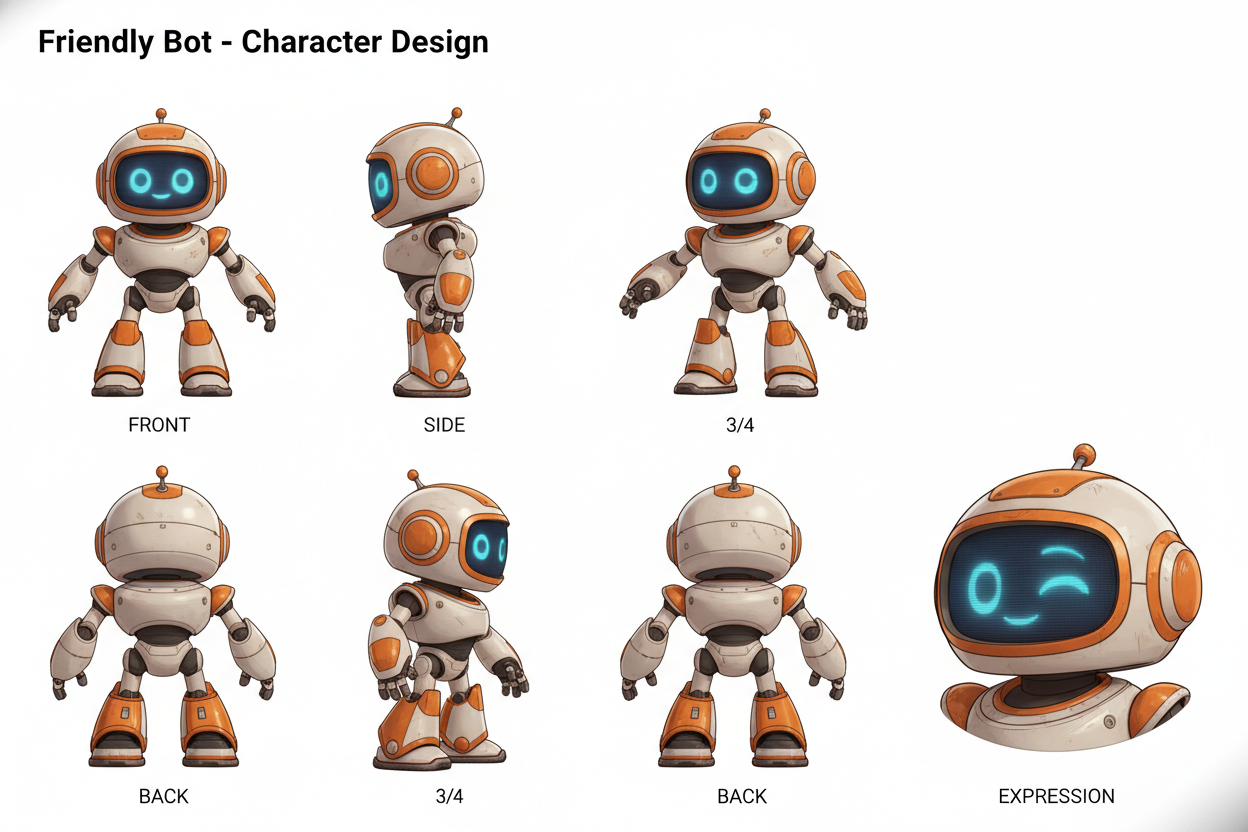
確認ポイント:
- 3Dスタイル(セルシェーディング、柔らかい影)になっているか
- ロボットのカラースキーム(白とオレンジ)が統一されているか
- 表情豊かなLED目が特徴的に描かれているか
2-5. Chibiスタイル(ステッカー用)
1枚の画像に複数の表情・ポーズを配置するChibiスタイルのシートです。LINEスタンプやSNS用のリアクション画像として活用できます。
意図:
| 要素 | 内容 |
|---|---|
| キャラクター | Miku(ターコイズのツインテール) |
| レイアウト | 6つの表情・ポーズを2x3グリッドで配置 |
| 表情 | 嬉しい、怒り、疲れ、興奮、考え中、大笑い |
| スタイル | Kawaii風、太いアウトライン、フラットカラー |
プロンプト:
Create a sheet of 6 chibi-style stickers of an anime girl named Miku
with different expressions and poses:

1. Happy with peace sign
2. Angry with steam coming out of ears
3. Tired with coffee mug
4. Excited with sparkles around her
5. Thinking with hand on chin
6. Laughing with tears of joy

Character features (consistent across all):
- Twin-tails with turquoise hair
- Large cyan eyes
- Wearing a futuristic black and gray outfit

Kawaii style with bold black outlines and flat colors.
White background, arranged in a 2x3 grid.
クリックしてPythonコマンドを生成
生成例:
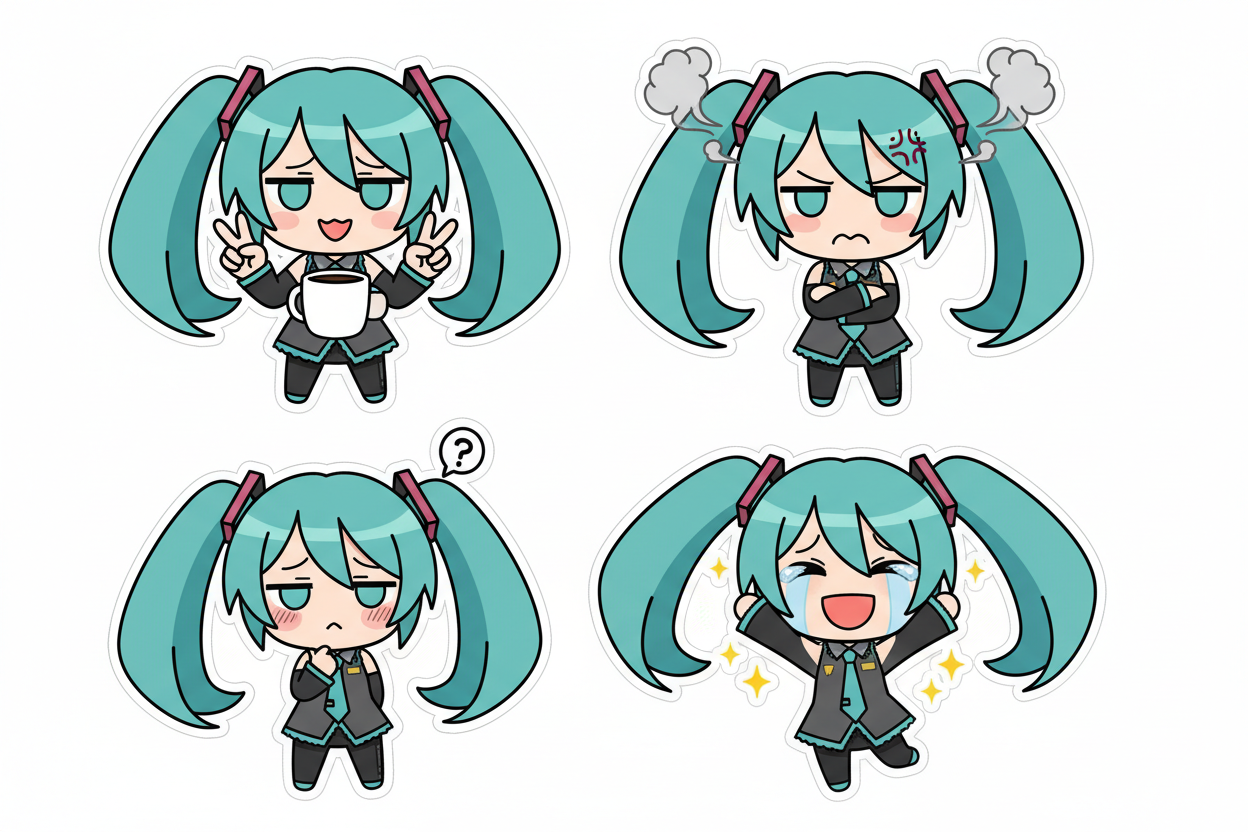
確認ポイント:
- 6つのポーズ/表情が2x3グリッドで配置されているか
- ターコイズのツインテールが全てで統一されているか
- Kawaii風の太いアウトラインとフラットな色使いになっているか
チェックポイント
- 基本キャラクターシート(Yuki)を生成した
- 異なるスタイル(エルフ、ロボット、Chibi)のいずれかを試した
セクション3: 参照画像チェーン
3-1. 概念
Nanobananaにはseed制御がないため、参照画像チェーンで一貫性を維持します。
キャラクターシート(アンカー)
        ↓ 参照画像として使用
     Panel 1
        ↓ アンカー + Panel 1 を参照
     Panel 2
        ↓ アンカー + Panel 2 を参照
     Panel 3
        ...
ポイント:
- 最初にキャラクターシート(アンカー画像)を生成する
- 新しいシーンを生成する際、アンカー画像を参照画像として渡す
- パネルが進むごとに、前のパネルも参照に追加していく
3-2. 実践:アンカー画像を生成
まず、参照用のアンカー画像(キャラクターシート)を生成します。
意図:
| 要素 | 内容 |
|---|---|
| キャラクター | Takeshi(20歳の武道家) |
| アングル | 正面と3/4を並べて配置 |
| 特徴 | 黒いスパイキーヘア、緑の目、左頬に傷 |
| 服装 | 使い込んだ赤い道着、黒帯 |
プロンプト:
Character sheet of Takeshi, a young Japanese martial artist:
Front view and 3/4 view side by side.

Character details:
- 20 years old male
- Spiky black hair
- Determined green eyes with a small scar on left cheek
- Athletic build
- Wearing a worn red martial arts gi with black belt

White background, anime style, clean lines.
クリックしてPythonコマンドを生成
生成例:
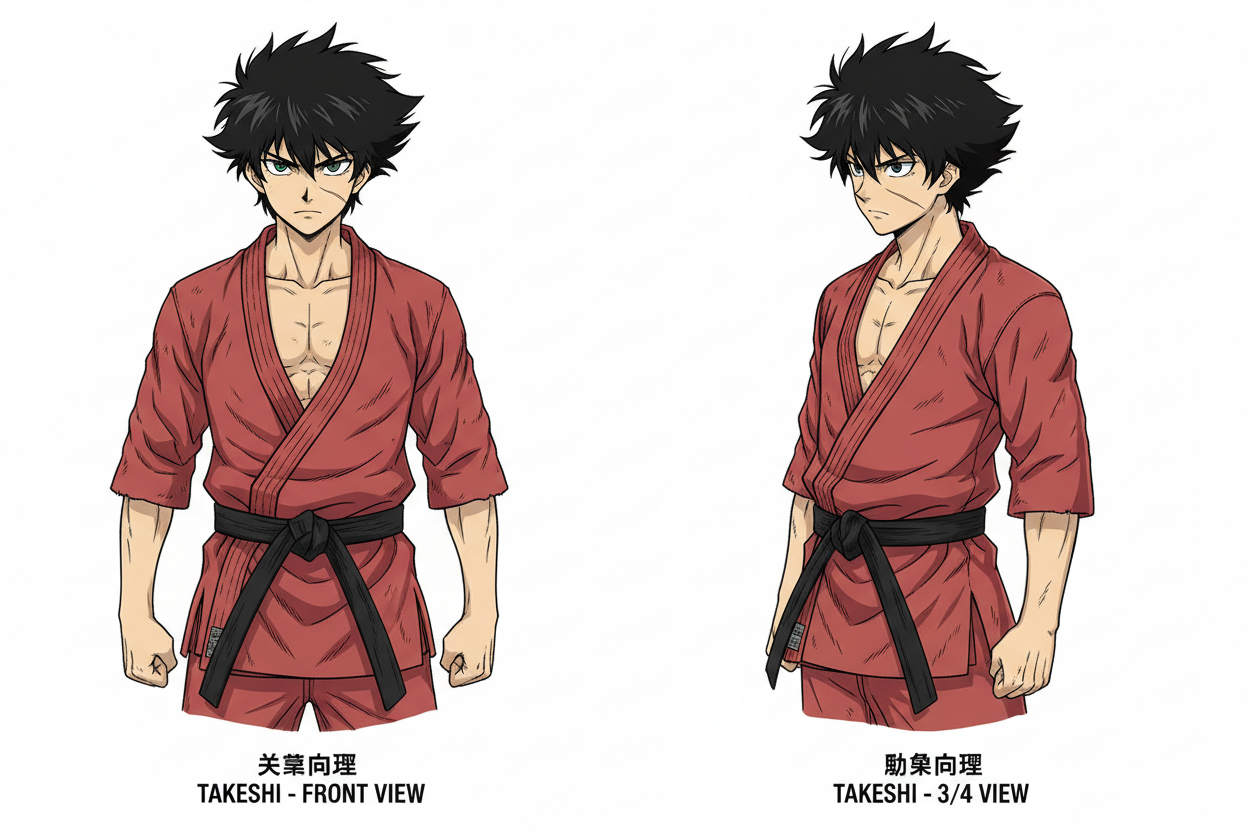
確認ポイント:
- 正面と3/4アングルが並んでいるか
- 黒いスパイキーヘア、緑の目、左頬の傷が描かれているか
- 赤い道着と黒帯が一貫しているか
重要: このアンカー画像のファイル名(
anchor_takeshi.png)を覚えておいてください。次のステップで参照画像として使用します。
3-3. 実践:参照画像を使ってシーンを生成
アンカー画像を参照して、新しいシーンを生成します。
Panel 1を生成(アンカーを参照)
意図:
| 要素 | 内容 |
|---|---|
| 参照画像 | anchor_takeshi.png |
| シーン | 崖の上に立つ武道家 |
| 表情 | 決意に満ちた目 |
| スタイル | 白黒マンガ、太いインク |
プロンプト:
Using the character from the reference image (maintain exact facial features:
spiky black hair, green eyes, scar on left cheek, red gi).

A high-impact manga panel, black and white ink style.
The character is shown in a medium shot, standing at the edge of a cliff.
Expression: Determined, eyes focused forward.
Wind blowing through his hair.
Dramatic cloudy sky with light rays breaking through.
Bold inking, dynamic composition.
クリックしてPythonコマンドを生成
生成例:
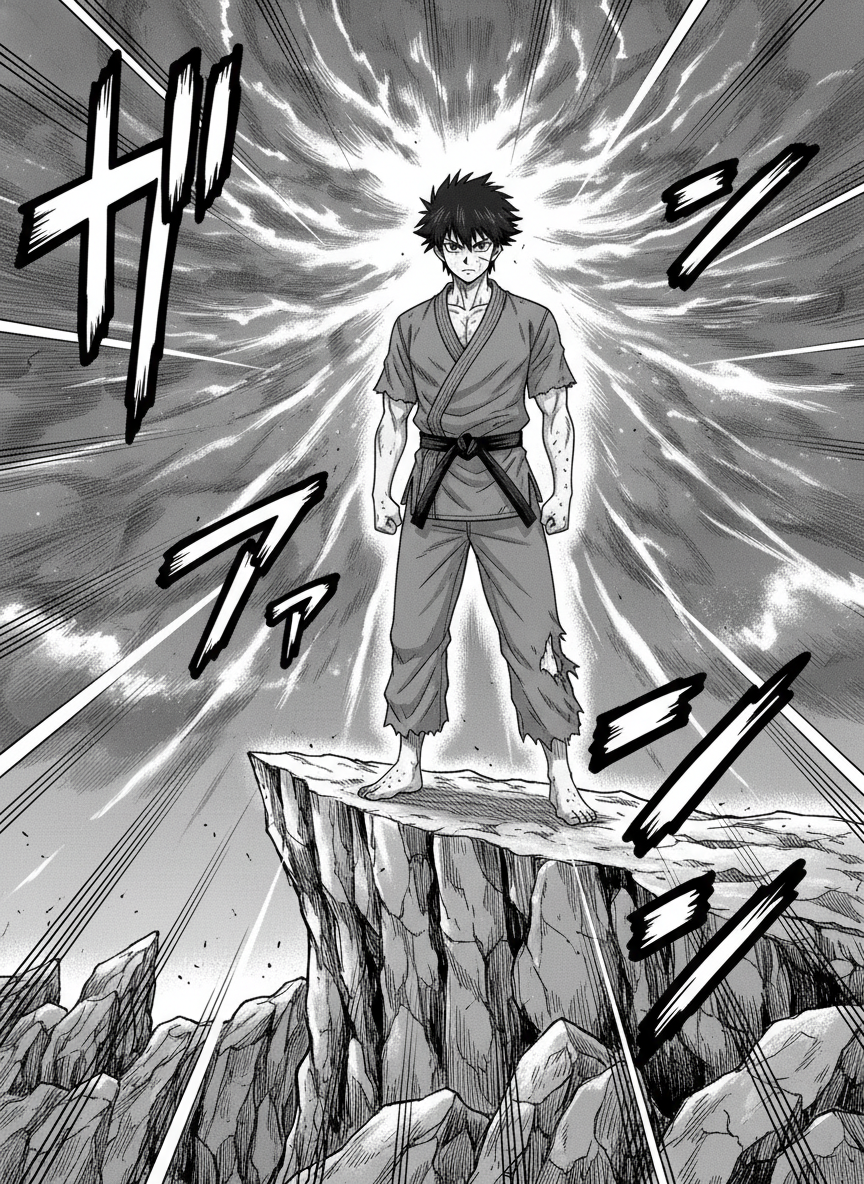
確認ポイント:
- キャラクターの顔がアンカー画像と一致しているか(黒髪、緑の目、左頬の傷)
- 白黒のマンガスタイルになっているか
- 崖の上に立ち、風が髪をなびかせているか
Panel 2を生成(アンカー + Panel 1を参照)
次のパネルでは、アンカーに加えて前のパネルも参照します。これにより、スタイルとキャラクターの両方の一貫性が保たれます。
意図:
| 要素 | 内容 |
|---|---|
| 参照画像 | anchor_takeshi.png + panel1.png |
| シーン | 振り返って何かを発見 |
| 表情 | 驚き、目を見開く |
| スタイル | Panel 1と同じ白黒マンガ |
プロンプト:
Continuing from the previous scene.
Using the same character from Image 1 (maintain exact facial features:
spiky black hair, green eyes, scar on left cheek, red gi).

Medium shot, character now turning to face the viewer.
Expression: Surprised, eyes wide.
A glowing object appears in the distance.
Maintain the same manga ink style with bold inking.
This scene continues from Image 2.
クリックしてPythonコマンドを生成
生成例:
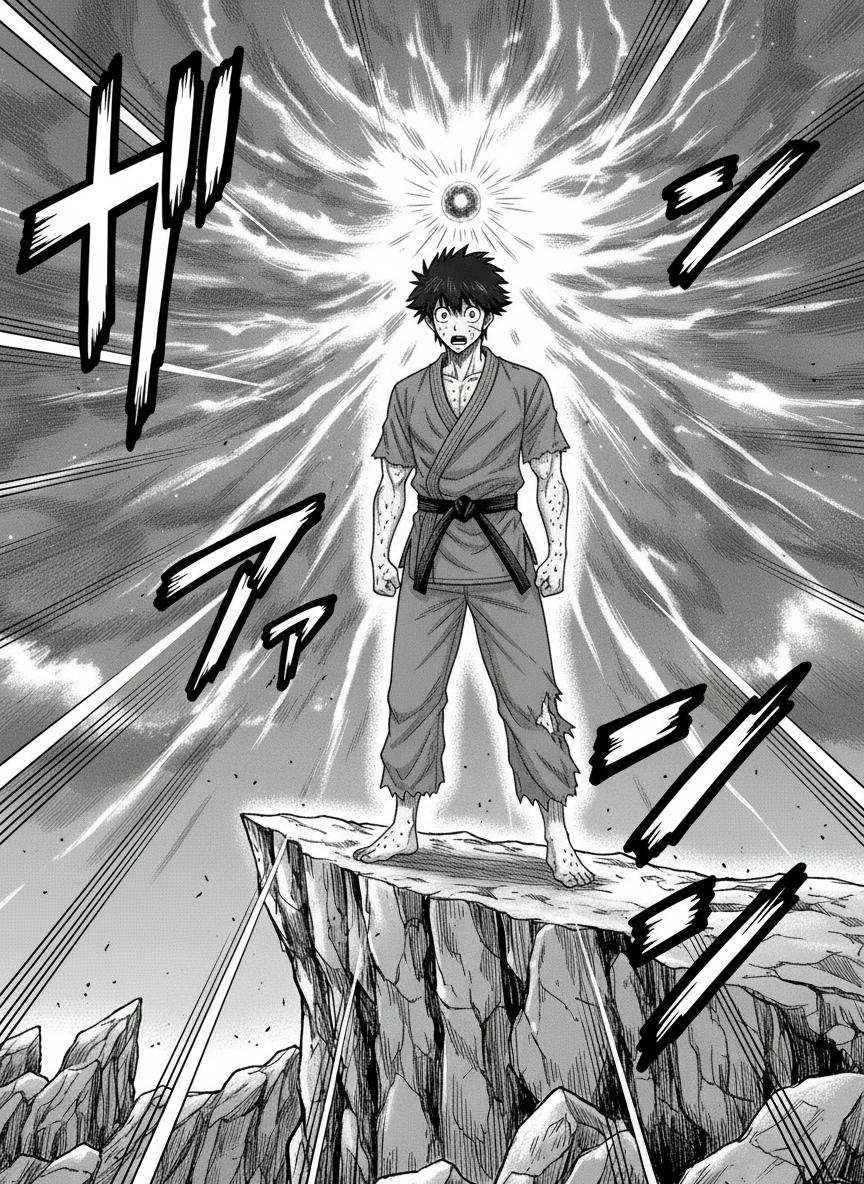
確認ポイント:
- キャラクターがPanel 1と同じ人物に見えるか
- 白黒マンガスタイルがPanel 1と統一されているか
- 物語が続いている感じがするか(振り返り、驚きの表情)
3-4. 特徴のロックイン
プロンプトで重要な特徴を繰り返し明記することで、一貫性が向上します。
ロックインすべき特徴:
| カテゴリ | 例 |
|---|---|
| 髪の色と形状 | Spiky black hair |
| 目の色と形 | Green eyes |
| 特徴的なマーク | Scar on left cheek |
| 服装の主要要素 | Red martial arts gi with black belt |
| 体型 | Athletic build |
テンプレート:
Using the same character (maintain exact features:
- Spiky black hair
- Green eyes
- Scar on left cheek
- Red martial arts gi
- Athletic build)
ヒント: キャラクターの特徴リストを定数として定義しておき、毎回のプロンプトにコピペすると一貫性が保ちやすくなります。
チェックポイント
- 参照画像チェーンの概念を理解した
- アンカー画像(
anchor_takeshi.png)を生成した - アンカーを参照してPanel 1を生成した
- アンカー + Panel 1を参照してPanel 2を生成した
セクション4: 連続マンガパネル生成
セクション3では武道家Takeshiで2パネルを生成しました。このセクションでは、魔法少女Hikariで3パネルの連続ストーリーを作成します。
4-1. Panelプロンプトのテンプレート
連続パネルを生成する際は、以下のテンプレートを使います。[角括弧] の部分を置き換えてください。
A high-impact manga panel, [スタイル記述].
The character from the reference image (maintain exact [特徴リスト])
is shown in a [ショットタイプ].

Expression: [表情].
Action: [アクション].
Background: [背景].

Style: [アートスタイル].
テンプレートの各要素:
| 要素 | 例 |
|---|---|
| スタイル記述 | black and white ink style, shoujo style |
| 特徴リスト | pink twin-tails, amber eyes, star wand |
| ショットタイプ | medium shot, close-up, wide shot |
| 表情 | Determined, Surprised, Cheerful |
| アクション | Standing, Running, Transforming |
| 背景 | Cherry blossom street, Dark clouds |
4-2. 実践:魔法少女Hikariの3パネルストーリー
アンカー画像を生成
まず、Hikariのキャラクターシートを作成します。
意図:
| 要素 | 内容 |
|---|---|
| キャラクター | Hikari(魔法少女) |
| アングル | 正面、横、アクションポーズ |
| 特徴 | ピンクのツインテール(黒リボン)、琥珀色の目 |
| 服装 | 白とピンクのドレス、星のモチーフ、星型ワンド |
プロンプト:
Character sheet of Hikari, a magical girl:
Front view, side view, and action pose.

Character details:
- Long pink twin-tails hair with black ribbons
- Large amber eyes
- Petite build
- Magical girl costume: white and pink dress with star motifs
- Star-shaped wand

Cute anime style, clean lines, pastel colors.
White background.
クリックしてPythonコマンドを生成
生成例:
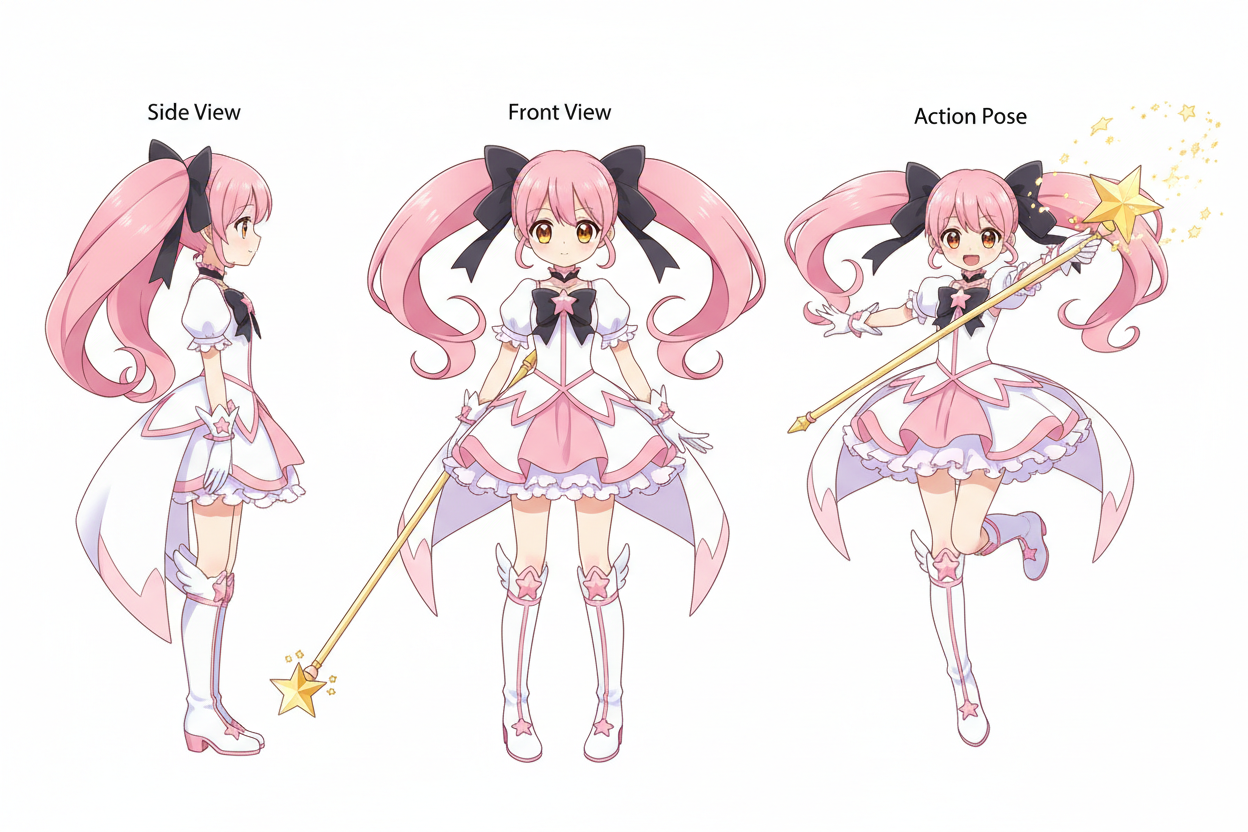
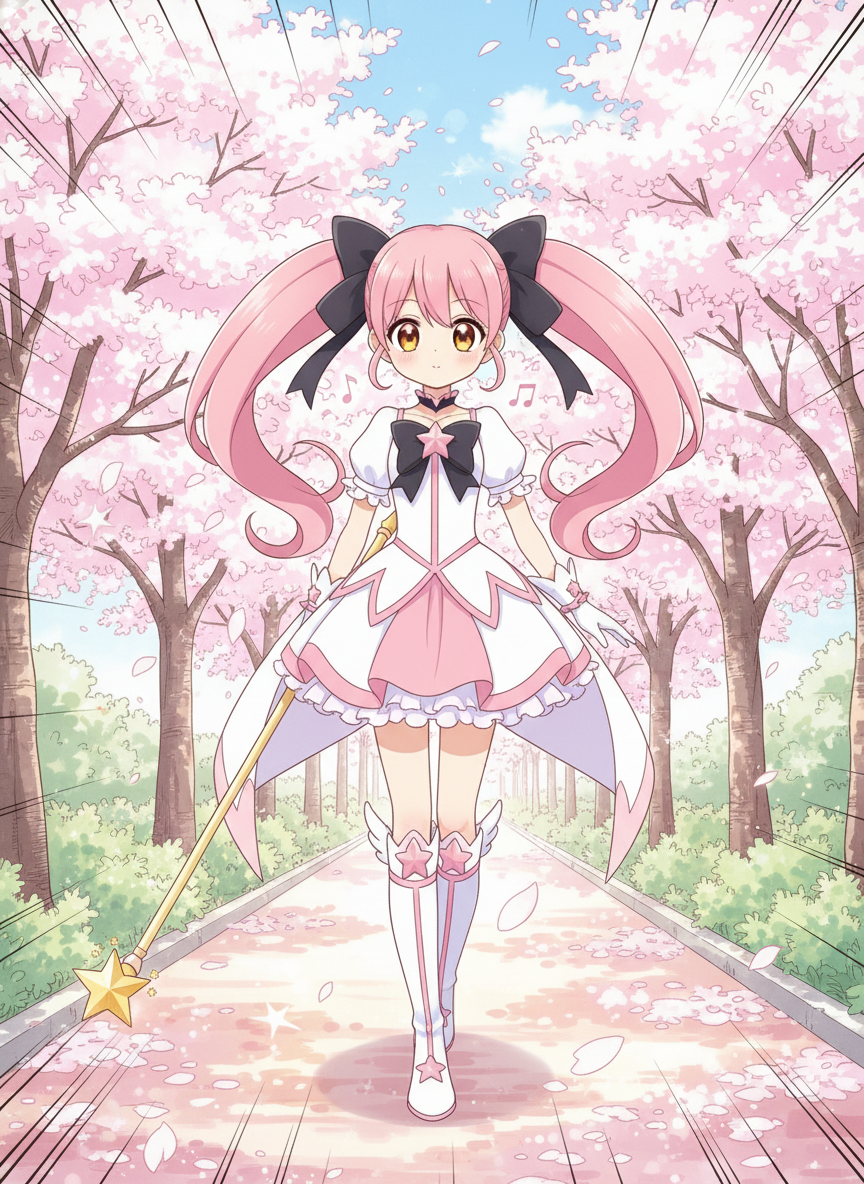
Panel 1(日常シーン)を生成
Hikariが朝、学校へ向かう日常シーンです。
プロンプト:
Using the character from the reference image.
Maintain exact features:
- Long pink twin-tails hair with black ribbons
- Large amber eyes
- Petite build
- Magical girl costume: white and pink dress with star motifs
- Star-shaped wand

Manga panel, shoujo style with sparkles and soft tones.
Hikari is walking to school on a sunny morning.
Expression: Cheerful, humming a tune.
Background: Cherry blossom-lined street.
クリックしてPythonコマンドを生成
生成例:
Panel 2(発見シーン)を生成
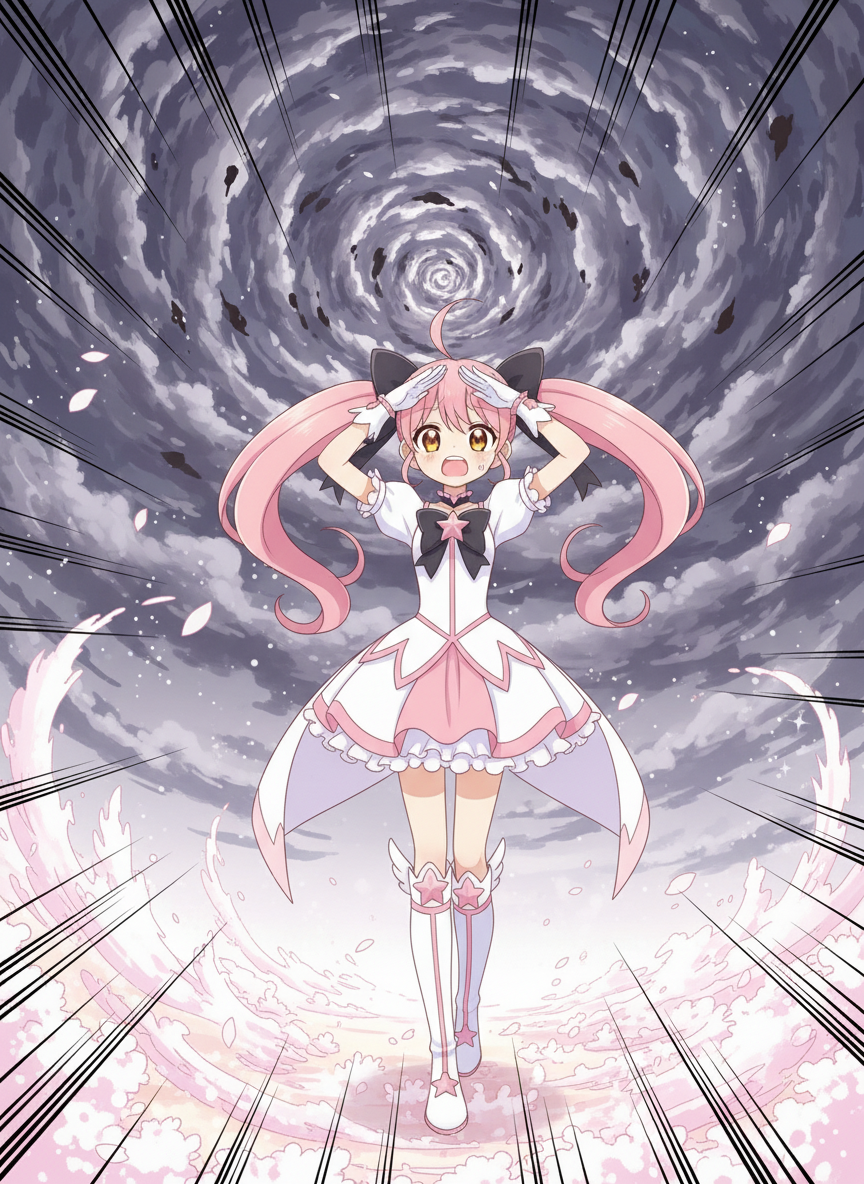
何か異変に気づくシーンです。
プロンプト:
Continuing from the previous scene.
Same character from Image 1, maintain exact features:
- Long pink twin-tails hair with black ribbons
- Large amber eyes
- Petite build
- Magical girl costume

Manga panel, dramatic angle.
Hikari notices something strange in the sky.
Expression: Surprised, eyes wide.
Action: Looking up, hand shading her eyes.
Background: Ominous dark clouds forming.
Speed lines for dramatic effect.
クリックしてPythonコマンドを生成
生成例:
Panel 3(変身シーン)を生成
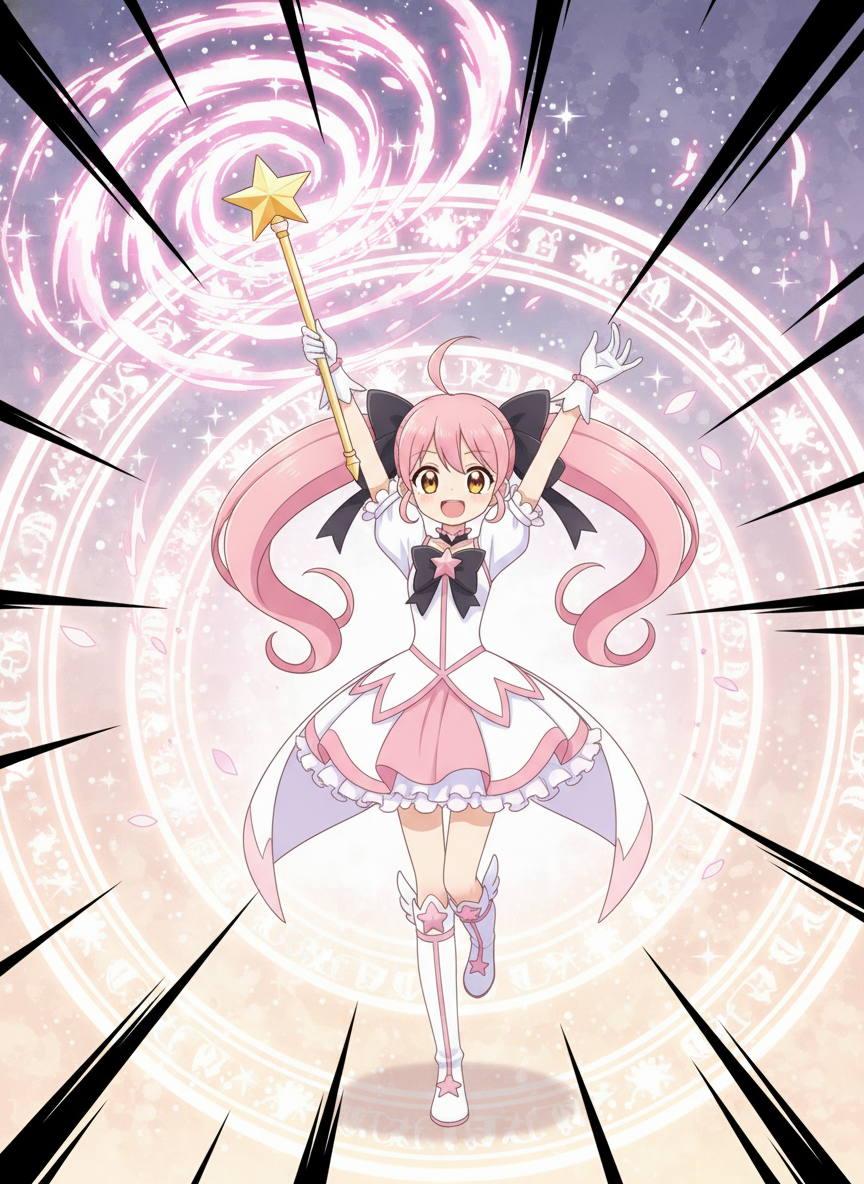
魔法少女に変身するクライマックスです。
プロンプト:
Continuing the story.
Same character from Image 1, maintain exact features:
- Long pink twin-tails hair with black ribbons
- Large amber eyes
- Petite build
- Magical girl costume: white and pink dress with star motifs
- Star-shaped wand

Manga panel, dynamic transformation sequence.
Hikari holds up her wand, magical energy swirling.
Expression: Determined, confident.
Action: Transformation pose with dramatic lighting.
Background: Magical circles and sparkles.
Bold impact lines radiating outward.
クリックしてPythonコマンドを生成
生成例:
生成結果を確認
3つのパネルを並べて確認してください。
確認ポイント:
- 全パネルでHikariの特徴(ピンクのツインテール、琥珀色の目)が一貫しているか
- 物語が「日常 → 発見 → 変身」と流れているか
- 少女漫画風のスタイル(スパークル、柔らかいトーン)が統一されているか
チェックポイント
- Hikariのアンカー画像を生成した
- 連続した3パネルを生成した
- キャラクターの一貫性を確認した
セクション5: 4コママンガ生成
4コママンガは一度に4パネルを生成することで、参照画像なしでもキャラクターとスタイルの一貫性が保たれます。
5-1. 4コマの基本構造(起承転結)
日本の4コママンガは「起承転結」の構造を持ちます。
| パネル | 役割 | 例 |
|---|---|---|
| 1(起) | 状況設定 | 女の子が机に座っている |
| 2(承) | 展開 | 窓の外に猫を発見 |
| 3(転) | 転換点 | 窓に駆け寄るが猫は消えた |
| 4(結) | オチ | 猫が背後の机に座っていた |
注意: AI生成の4コママンガでは、セリフや効果音が意図通りに表示されないことがあります。生成後にCanvaなどの画像編集ツールでテキストを調整することをお勧めします。
5-2. レイアウト画像を使う(推奨)
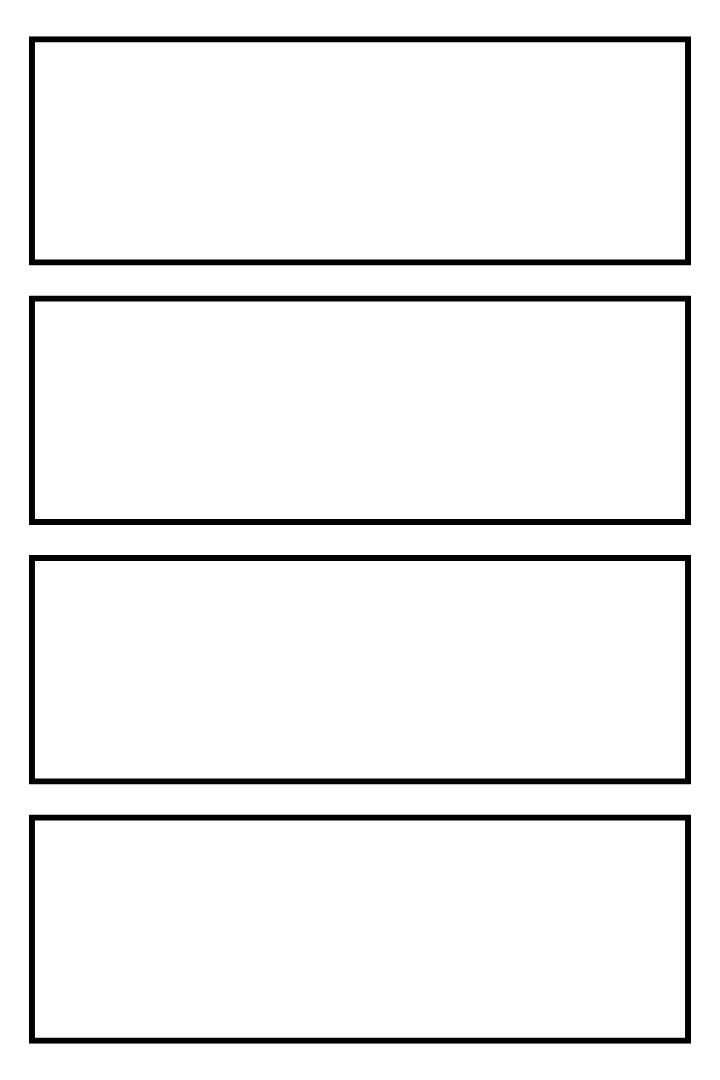
4コママンガを生成する際、パネル数やレイアウトが安定しないことがあります。これを解決するために、空のレイアウト画像を参照画像として使う方法があります。
Step 1: レイアウト画像をダウンロード
以下のリンクから4コマ用のレイアウト画像をダウンロードしてください。
Step 2: 作業フォルダに保存
ダウンロードした画像を以下の場所に保存してください。
- 保存先:
C:\nanobanana\ - ファイル名:
4koma_layout.png
Step 3: 参照画像として使用
4コマを生成する際に、このレイアウト画像を参照画像として指定します。
python generate_image.py "プロンプト" --ref 4koma_layout.png --out 4koma_output.png --ratio 2:3
これにより、パネル数とレイアウトが安定します。
5-3. 実践:日常4コマを生成(レイアウト参照あり)
意図:
| 要素 | 内容 |
|---|---|
| ジャンル | 日常系コメディ |
| キャラクター | 茶髪ツインテールのChibi少女 |
| ストーリー | 猫を探す→意外な場所にいた |
| 参照画像 | 4koma_layout.png |
プロンプト:
A 4-panel manga strip (4-koma) layout, vertical arrangement, slice of life genre.

Panel 1: A cute chibi girl with twin-tails sitting at a desk, looking bored.
Panel 2: She notices a cat outside the window, expression changes to curious.
         Eyes sparkling with interest.
Panel 3: She rushes to the window, but the cat has disappeared.
         Expression: Disappointed, shoulders slumped.
Panel 4: The cat is now sitting on her desk behind her.
         Expression: Shocked surprise, sweat drop.
         The cat looks smug.

Character consistency: Same girl in all panels with:
- Short brown twin-tails
- Large brown eyes
- Pink casual outfit
- Expressive chibi proportions

Style: Cute Japanese manga, clean lines, light screentone shading.
Panel borders clearly defined.
クリックしてPythonコマンドを生成
生成例:
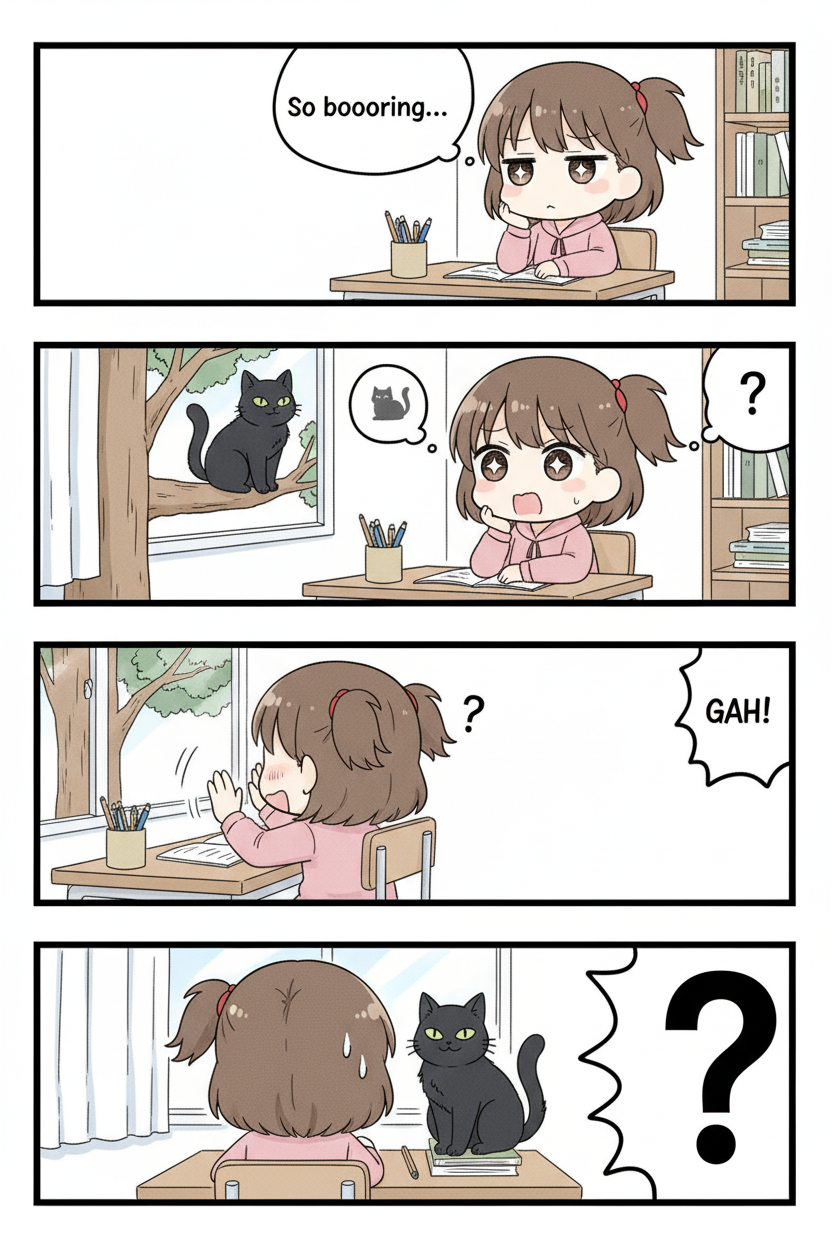
確認ポイント:
- 4つのパネルが縦に並んでいるか
- 各パネルの境界線がはっきり見えるか
- 女の子の特徴(茶色ツインテール、ピンクの服)が4パネルとも同じか
- 起承転結のストーリーが伝わるか
5-4. 実践:オフィスコメディ4コマ(レイアウト参照あり)
意図:
| 要素 | 内容 |
|---|---|
| ジャンル | オフィスコメディ |
| キャラクター | 疲れた男性社員、明るい女性同僚 |
| ストーリー | コーヒーが空→犯人発見→予想以上の被害 |
| 参照画像 | 4koma_layout.png |
プロンプト:
A 4-panel manga strip (4-koma), vertical arrangement, office comedy genre.

Panel 1: A tired businessman reaches for his coffee mug on his desk.
         Morning sunlight through office windows.
Panel 2: He tilts his mug toward himself and stares at the completely dry,
         coffee-stained bottom - not a single drop remains inside.
         Question marks floating above his head.
Panel 3: He turns to see his coworker frozen mid-sip, holding a steaming full cup.
         She looks guilty with sweat drops.
Panel 4: Wide shot revealing the coworker surrounded by 3 drained cups.
         The main character slumps in defeat.
         The coworker gives a nervous peace sign.

Character consistency:
- Main character: tired-looking man with messy hair and loose tie, NO coffee in his mug
- Coworker: cheerful woman with short hair, SHE has all the coffee

Style: Clean manga art, expressive reactions, office background.
クリックしてPythonコマンドを生成
生成例:
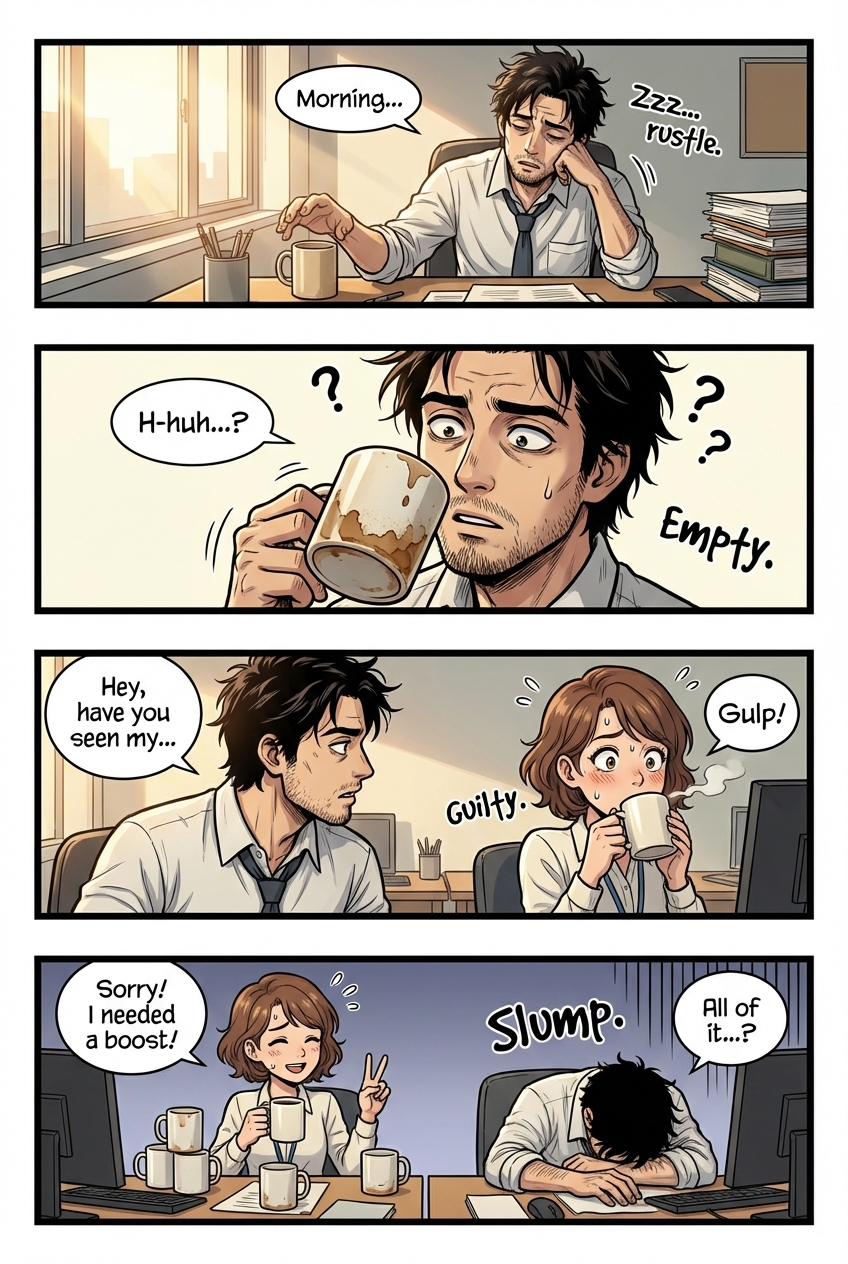
確認ポイント:
- 2人のキャラクターが識別できるか
- オフィスの雰囲気が伝わるか
- オチ(3杯のカップ)が分かりやすいか
5-5. 参照画像と組み合わせた4コマ
セクション2で作成したキャラクターシートを参照して、そのキャラクターの4コマを生成します。レイアウト画像とキャラクターシートの両方を参照することで、パネル構成とキャラクター一貫性を両立できます。
意図:
| 要素 | 内容 |
|---|---|
| 参照画像 | 4koma_layout.png + character_sheet_yuki.png |
| キャラクター | Yuki(セクション2で作成したキャラクターシートを参照) |
| ジャンル | 学園コメディ |
| ストーリー | ラブレター発見→喜ぶ→実は宛先違い |
プロンプト:
Using the character from the reference image (silver-haired anime girl in school uniform),
create a 4-panel manga strip (4-koma), vertical arrangement.

Panel 1: The character stands at her locker, finding a pink envelope inside.
         She looks curious, holding the letter up.
Panel 2: She reads the letter - it says "I like you" with a heart.
         Her face glows with happiness, sparkles around her.
Panel 3: Close-up of her blushing face, cheeks bright red, hands on cheeks.
         Hearts floating around her head.
Panel 4: She notices the envelope says "To: Tanaka-san" (not her name).
         She slumps in despair, dark rain clouds above her head.

Maintain exact character features from the reference (silver hair, violet eyes, school uniform).
Style: Cute manga art, clean lines, expressive reactions.
Panel borders clearly defined with equal spacing.
クリックしてPythonコマンドを生成
生成例:
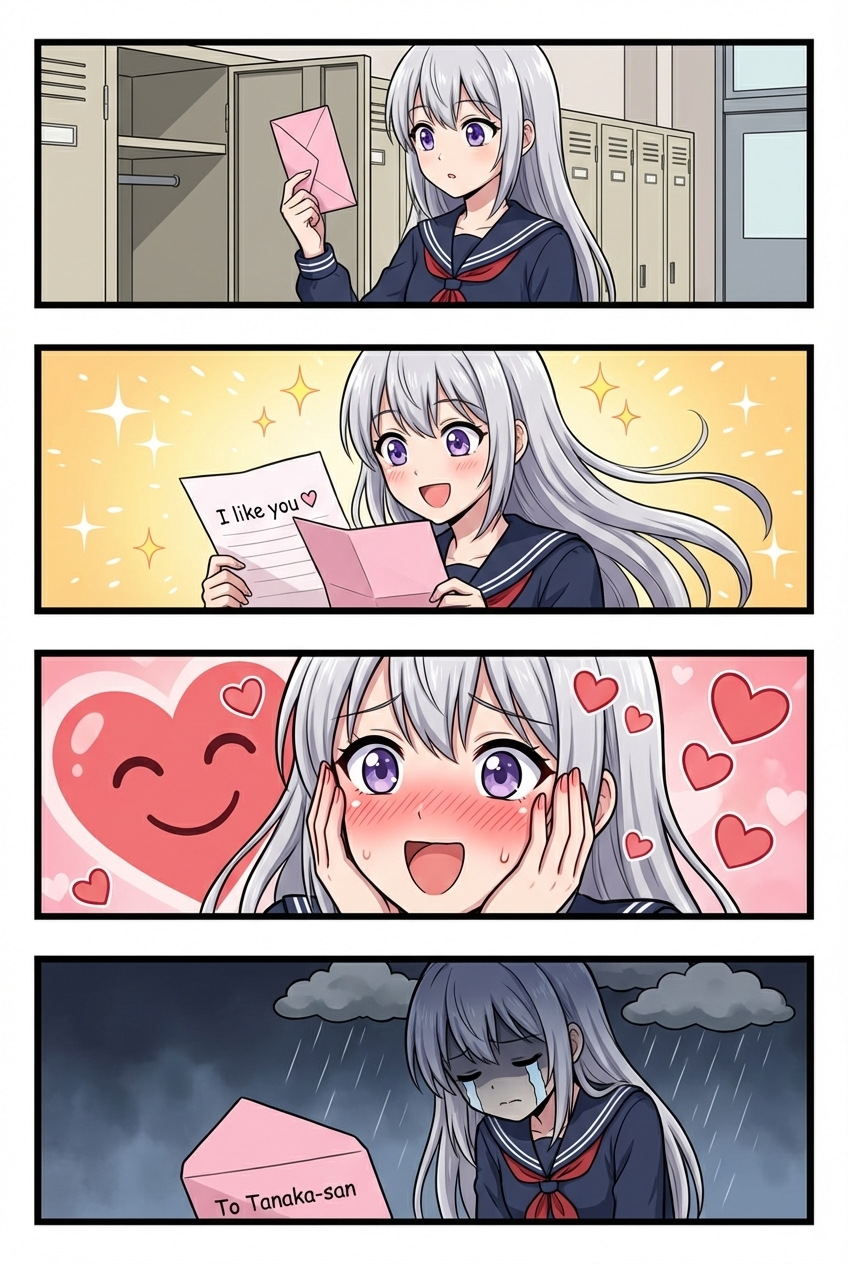
確認ポイント:
- Yukiの特徴(銀髪、紫の目、制服)が維持されているか
- キャラクターシートと同じ人物に見えるか
- 少女漫画風のスタイル(スクリーントーン、キラキラ)になっているか
チェックポイント
- 4コママンガを一度に生成した(猫と少女 or コーヒー泥棒)
- 参照画像を使った4コマを生成した(ラブレター)
トラブルシューティング
キャラクターの顔が変わってしまう
原因: 参照画像が不十分、または特徴の記述が曖昧
解決策:
- アンカー画像に複数アングル(正面・側面・3/4)を含める
- プロンプトで特徴を毎回明示的に記述する
- 「maintain exact facial features from the reference image」を必ず含める
服装が変わってしまう
原因: 服装の記述が不十分
解決策: 服装の詳細もロックイン要素として毎回記述する:
Wearing the same outfit as in the reference:
- Dark blue school uniform
- White sailor collar
- Red ribbon bow tie
パネル間でスタイルが変わる
原因: スタイル記述が一貫していない
解決策:
- スタイル記述を定数として定義し、毎回使用する
- 前のパネルを参照画像として含める
- 「Maintain the same art style as the reference」を追加
4コマでパネルが分離しない
原因: パネル境界の指定が不十分
解決策:
Panel borders clearly defined with thin black lines.
Clear white gutters between panels.
Each panel is a distinct scene.
まとめ
このモジュールで学んだこと
- Character DNA Workflow: アンカー→参照→明示的記述→ロックイン
- キャラクターシート: 複数アングルのリファレンスを1枚で生成
- 参照画像チェーン: seedの代わりに参照画像で一貫性を維持
- 連続パネル: 前のパネルを参照しながら物語を進める
- 4コママンガ: 一度に4パネルを生成してスタイル統一
キャラクター一貫性チェックリスト
- アンカー画像を作成した
- 特徴リストを定義した
- 各パネルで特徴を明示的に記述している
- 参照画像を適切に使用している
次のステップ
Module 06では、参照画像のより高度な活用方法を学びます。スタイル転写、背景合成、複数画像の組み合わせについて習得します。
よくある質問
Q: アンカー画像は毎回新しく作る必要がありますか? A: いいえ。一度作成したアンカー画像は、そのキャラクターを使う限り再利用できます。ただし、長期プロジェクトでは複数のアンカー画像(異なる表情、服装)を用意しておくと便利です。
Q: 参照画像は何枚まで使えますか? A: Nano Banana(Gemini 2.5 Flash)は最大3枚、Nano Banana Pro(Gemini 3 Pro)は最大14枚です。ただし、多すぎると混乱するため、5枚程度がベストです。
Q: 参照画像のサイズに制限はありますか? A: 公式の制限は明示されていませんが、解像度が高すぎるとAPIエラーになることがあります。1024x1024程度に縮小することを推奨します。
Q: 実写とアニメを混ぜることはできますか? A: 技術的には可能ですが、結果が不安定になります。同じスタイル(アニメ同士、実写同士)の参照画像を使用することを推奨します。
Q: 吹き出しのテキストは正確に表示されますか? A: 日本語テキストは精度が不安定です。重要なテキストは後から画像編集ソフトで追加することを推奨します。または、実写・テキスト・編集のテキスト制御技術を参照してください。