実写・テキスト・編集
このモジュールで学ぶこと
- 実写人物の生成と制限事項
- プロフェッショナルなポートレート写真の生成
- テキストを含む画像の生成と制御
- 既存画像の背景変更と部分編集
学習目標
このモジュールを終えると、以下のことができるようになります:
- 高品質な実写人物ポートレートを生成できる
- 正確なテキストを含む画像を生成できる
- 既存画像の背景を変更できる
- 画像の一部分のみを編集できる
目次
- 事前準備
- セクション1: 実写人物生成
- セクション2: プロフェッショナルポートレート
- セクション3: テキスト制御
- セクション4: 背景変更・置換
- セクション5: 部分編集(Inpainting)
- トラブルシューティング
- まとめ
- よくある質問
事前準備
必要なもの
このモジュールで使用する参照画像
このモジュールでは編集元となる画像を多数使用します。以下の方法で準備してください。
| セクション | 必要な画像 | 用途 | 入手方法 |
|---|---|---|---|
| 2-3 | selfie.jpg | 写真をプロに変換 | 自分の写真 or Step 1で生成 |
| 4-1 | original_photo.jpg | 背景をスタジオに変更 | 自分の写真 or Step 1で生成 |
| 4-2 | summer_photo.jpg | 夏→冬に季節変更 | 屋外の写真 or Step 2で生成 |
| 4-3 | portrait.jpg | ファンタジー背景に変更 | ポートレート or Step 1で生成 |
| 5-1 | black_jacket.jpg | ジャケットの色変更 | ジャケット着用写真 or Step 3で生成 |
| 5-2 | street_photo.jpg | 背景のオブジェクト削除 | 街中の写真 or Step 2で生成 |
| 5-3 | portrait_no_glasses.jpg | メガネを追加 | ポートレート or Step 1で生成 |
| 5-4 | neutral_face.jpg | 表情を笑顔に変更 | 無表情写真 or Step 1で生成 |
| 5-5 | casual_photo.jpg | 髪色・服装を複合編集 | カジュアル写真 or Step 3で生成 |
ヒント: 同じ人物を複数のセクションで使用することで、一貫した学習体験が得られます。Step 1-3で画像を生成し、各ステップ末尾のコピーコマンドで必要なファイル名にコピーしてください。
サンプル画像の生成(自分の写真がない場合)
自分の写真を使わずに演習を進めたい場合は、以下のジェネレータでサンプル人物写真を生成してください。
Step 1: 基本ポートレート
セクション2-3、4-1、4-3、5-3、5-4で使用するポートレート写真を生成します。
意図:
| 要素 | 内容 |
|---|---|
| 目的 | 編集元となる基本ポートレート |
| 被写体 | 30歳の日本人女性 |
| 構図 | バストアップ、正面向き |
| 表情 | 穏やかな笑顔 |
| 背景 | 屋内の自然な環境 |
プロンプト:
A photorealistic portrait of a 30-year-old Japanese woman.

Subject Details:
- Shoulder-length black hair with natural texture
- Warm brown eyes with a gentle expression
- Natural skin with subtle makeup
- Wearing a light blue casual blouse

Expression: Calm, friendly smile

Setting:
- Indoor environment with soft natural light
- Blurred home background
- Warm, inviting atmosphere

Technical:
- Bust-up shot, facing camera
- 50mm lens, natural perspective
- Soft lighting from window

Style: Natural, candid photo aesthetic.
クリックしてPythonコマンドを生成
確認ポイント:
- 自然な肌の質感で実写らしく見えるか
- 表情が穏やかで編集素材として使いやすいか
- 背景がシンプルで編集しやすいか
ファイルコピー:
生成した sample_portrait.png を以下のファイル名でコピーしてください。
| コピー先 | 使用セクション |
|---|---|
| selfie.jpg | 2-3 写真変換 |
| original_photo.jpg | 4-1 背景変更 |
| portrait.jpg | 4-3 ファンタジー背景 |
| portrait_no_glasses.jpg | 5-3 メガネ追加 |
| neutral_face.jpg | 5-4 表情変更 |
PowerShell / コマンドプロンプトの場合:
copy sample_portrait.png selfie.jpg && copy sample_portrait.png original_photo.jpg && copy sample_portrait.png portrait.jpg && copy sample_portrait.png portrait_no_glasses.jpg && copy sample_portrait.png neutral_face.jpg
Git Bashの場合:
cp sample_portrait.png selfie.jpg && cp sample_portrait.png original_photo.jpg && cp sample_portrait.png portrait.jpg && cp sample_portrait.png portrait_no_glasses.jpg && cp sample_portrait.png neutral_face.jpg
Step 2: 屋外写真(夏の公園)
セクション4-2、5-2で使用する屋外写真を生成します。
意図:
| 要素 | 内容 |
|---|---|
| 目的 | 季節変更や背景編集の素材 |
| 被写体 | 同じ30歳の日本人女性 |
| 環境 | 夏の公園、緑豊か |
| 背景 | 人や車などのオブジェクトあり |
プロンプト:
A photorealistic outdoor photo of a 30-year-old Japanese woman in a summer park.

Subject Details:
- Shoulder-length black hair
- Warm brown eyes
- Wearing a white t-shirt and jeans
- Standing casually

Environment:
- Lush green summer park
- Bright sunny day
- Trees and grass in background
- A parked car visible in the distance
- Other people walking in background

Technical:
- Full body shot
- 35mm lens, environmental portrait
- Natural daylight, slight shadows

Style: Casual summer snapshot aesthetic.
クリックしてPythonコマンドを生成
確認ポイント:
- 夏らしい緑豊かな環境になっているか
- 背景に編集で削除できそうなオブジェクト(車など)があるか
- 人物と背景の区別がはっきりしているか
ファイルコピー:
生成した sample_outdoor.png を以下のファイル名でコピーしてください。
| コピー先 | 使用セクション |
|---|---|
| summer_photo.jpg | 4-2 季節変更 |
| street_photo.jpg | 5-2 オブジェクト削除 |
PowerShell / コマンドプロンプトの場合:
copy sample_outdoor.png summer_photo.jpg && copy sample_outdoor.png street_photo.jpg
Git Bashの場合:
cp sample_outdoor.png summer_photo.jpg && cp sample_outdoor.png street_photo.jpg
Step 3: フォーマル写真(ジャケット着用)
セクション5-1、5-5で使用するジャケット着用写真を生成します。
意図:
| 要素 | 内容 |
|---|---|
| 目的 | 服の色変更や複合編集の素材 |
| 被写体 | 同じ30歳の日本人女性 |
| 服装 | 黒いジャケット |
| 髪色 | 茶色(複合編集で変更予定) |
プロンプト:
A photorealistic portrait of a 30-year-old Japanese woman in business casual attire.

Subject Details:
- Shoulder-length brown hair (for later editing to blonde)
- Warm brown eyes
- Neutral expression
- Wearing a black blazer jacket over a gray t-shirt

Setting:
- Simple indoor background
- Neutral office-like environment
- Soft, even lighting

Technical:
- Upper body shot
- 50mm lens
- Professional but casual

Style: Business casual portrait, natural lighting.
クリックしてPythonコマンドを生成
確認ポイント:
- 黒いジャケットがはっきり見えるか
- 髪色が茶色(後で変更するため)になっているか
- シンプルな背景で編集しやすいか
ファイルコピー:
生成した sample_formal.png を以下のファイル名でコピーしてください。
| コピー先 | 使用セクション |
|---|---|
| black_jacket.jpg | 5-1 ジャケット色変更 |
| casual_photo.jpg | 5-5 複合編集 |
PowerShell / コマンドプロンプトの場合:
copy sample_formal.png black_jacket.jpg && copy sample_formal.png casual_photo.jpg
Git Bashの場合:
cp sample_formal.png black_jacket.jpg && cp sample_formal.png casual_photo.jpg
生成した画像の確認
事前準備が完了したら、以下のファイルが揃っていることを確認してください。
| ファイル名 | 用途 | 生成元 |
|---|---|---|
| selfie.jpg | 2-3 写真変換 | Step 1 |
| original_photo.jpg | 4-1 背景変更 | Step 1 |
| summer_photo.jpg | 4-2 季節変更 | Step 2 |
| portrait.jpg | 4-3 ファンタジー背景 | Step 1 |
| black_jacket.jpg | 5-1 色変更 | Step 3 |
| street_photo.jpg | 5-2 オブジェクト削除 | Step 2 |
| portrait_no_glasses.jpg | 5-3 メガネ追加 | Step 1 |
| neutral_face.jpg | 5-4 表情変更 | Step 1 |
| casual_photo.jpg | 5-5 複合編集 | Step 3 |
チェックポイント
- Step 1-3でサンプル画像を生成した(または自分の写真を用意した)
- 各セクションで使用するファイル名にコピー/リネームした
-
C:\nanobanana\フォルダに画像が揃っている
セクション1: 実写人物生成
1-1. できることと制限事項
できること:
| 機能 | 説明 |
|---|---|
| 大人の人物生成 | デフォルトで許可 |
| 全年齢の人物生成 | 設定で許可可能 |
| 360度ビュー生成 | 同一人物を異なる角度で |
| スタイル変換 | ポートレートを別スタイルに |
| 複数人物合成 | 最大5-6枚の参照画像で |
| 顔の編集 | 髪型、メイク、背景の変更 |
制限事項:
| 制限 | 詳細 |
|---|---|
| セレブリティ | 生成不可(すべての設定で禁止) |
| 未成年コンテンツ | 厳しいフィルター |
| NSFW/暴力/ヘイト | 禁止 |
| ディープフェイク | 禁止 |
| 同意のない画像 | 禁止 |
| SynthIDウォーターマーク | すべての生成画像に必ず付与 |
1-2. リアリティ向上のキーワード
| カテゴリ | キーワード例 |
|---|---|
| リアリズム | photorealistic, ultra-realistic, hyper-realistic |
| 肌の質感 | natural skin texture, visible pores, subtle wrinkles |
| レンズ効果 | 85mm portrait lens, shallow depth of field, bokeh |
| 照明 | soft natural daylight, studio lighting, golden hour |
| 詳細 | fine facial details, individual hair strands, natural imperfections |
1-3. 避けるべき表現
- 特定の有名人の名前
- 未成年を示唆する表現
- 暴力的・性的な表現
- 実在の人物を模倣する意図
チェックポイント
- 実写人物生成の制限を理解した
- リアリティ向上のキーワードを把握した
セクション2: プロフェッショナルポートレート
2-1. LinkedInプロフェッショナルヘッドショット
ビジネス用の高品質なヘッドショットを生成します。
プロンプトの意図:
| カテゴリ | 記述 | 意図 |
|---|---|---|
| 被写体 | confident 35-year-old Japanese businessman | 具体的な人物像を設定 |
| 外見 | Clean-shaven, neat short black hair | 清潔感のあるビジネスパーソン |
| 表情 | subtle confident smile | 自信のある控えめな笑顔 |
| 服装 | Tailored charcoal gray suit, white dress shirt | プロフェッショナルな服装 |
| レンズ | 85mm portrait lens, f/2.8 | ポートレート向けの焦点距離と被写界深度 |
| 照明 | Soft diffused front lighting, rim light | スタジオ品質の照明設定 |
| 背景 | Neutral gray studio gradient | プロフェッショナルな無地背景 |
A photorealistic professional headshot of a confident 35-year-old
Japanese businessman.

Subject Details:
- Clean-shaven with neat short black hair
- Warm brown eyes with a subtle confident smile
- Natural skin texture with visible pores

Attire:
- Tailored charcoal gray suit with subtle pinstripe
- Crisp white dress shirt
- Burgundy silk tie with small pattern

Technical Specifications:
- 85mm portrait lens, f/2.8 aperture
- Soft diffused front lighting eliminating harsh shadows
- Slight rim light separating subject from background
- Sharp focus on eyes, smooth background bokeh

Background:
- Neutral gray studio gradient
- Professional, clean aesthetic

Style: Ultra-realistic, hyper-detailed, LinkedIn-appropriate.
クリックしてPythonコマンドを生成
生成例:
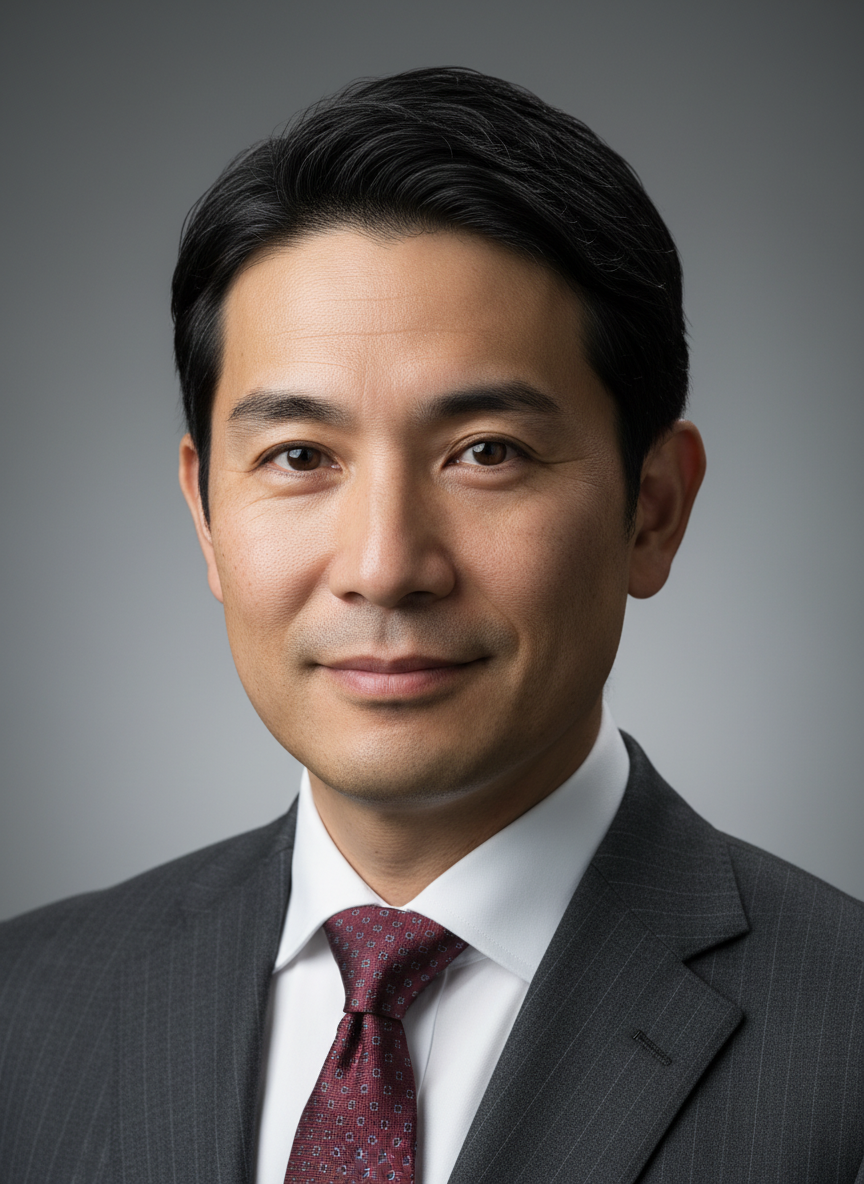
確認ポイント:
- 35歳くらいの日本人ビジネスマンに見えるか
- 自然な肌の質感(毛穴が見える程度)が表現されているか
- 柔らかい照明で目にシャープなフォーカスがあるか
- 背景が滑らかにぼけているか(ボケ効果)
- LinkedInに使えるプロフェッショナルな雰囲気か
2-2. シネマティックポートレート
フィルム・ノワール風のドラマチックなポートレートを生成します。
プロンプトの意図:
| カテゴリ | 記述 | 意図 |
|---|---|---|
| 被写体 | 40-year-old man with weathered features and stubble | 風格のある男性像 |
| 表情 | Intense gaze, slight furrow in brow | 緊張感のある表情 |
| 雰囲気 | wet, rainy city street at 3 AM | 深夜の雨に濡れた都会 |
| コントラスト | Moody shadows with high contrast | ノワール特有の明暗 |
| 照明 | Low-key lighting, single streetlamp | 単一光源の劇的な照明 |
| 質感 | Heavy film grain for vintage feel | ヴィンテージフィルムの粒子感 |
| 色調 | Desaturated colors, almost monochrome | ほぼモノクロームの彩度低下 |
A hyper-realistic cinematic portrait with dramatic Film Noir aesthetic.

Subject:
- A 40-year-old man with weathered features and stubble
- Intense gaze, slight furrow in brow
- Wearing a dark overcoat with collar turned up

Atmosphere:
- Standing on a wet, rainy city street at 3 AM
- Moody shadows with high contrast
- Heavy film grain for vintage feel

Lighting:
- Low-key lighting with a single streetlamp
- Strong rim light creating silhouette effect
- Reflections in puddles on the street

Technical:
- Shot on 50mm lens
- Desaturated colors, almost monochrome
- Cinematic 16:9 aspect ratio

Style: Noir film still, dramatic, atmospheric.
クリックしてPythonコマンドを生成
生成例:
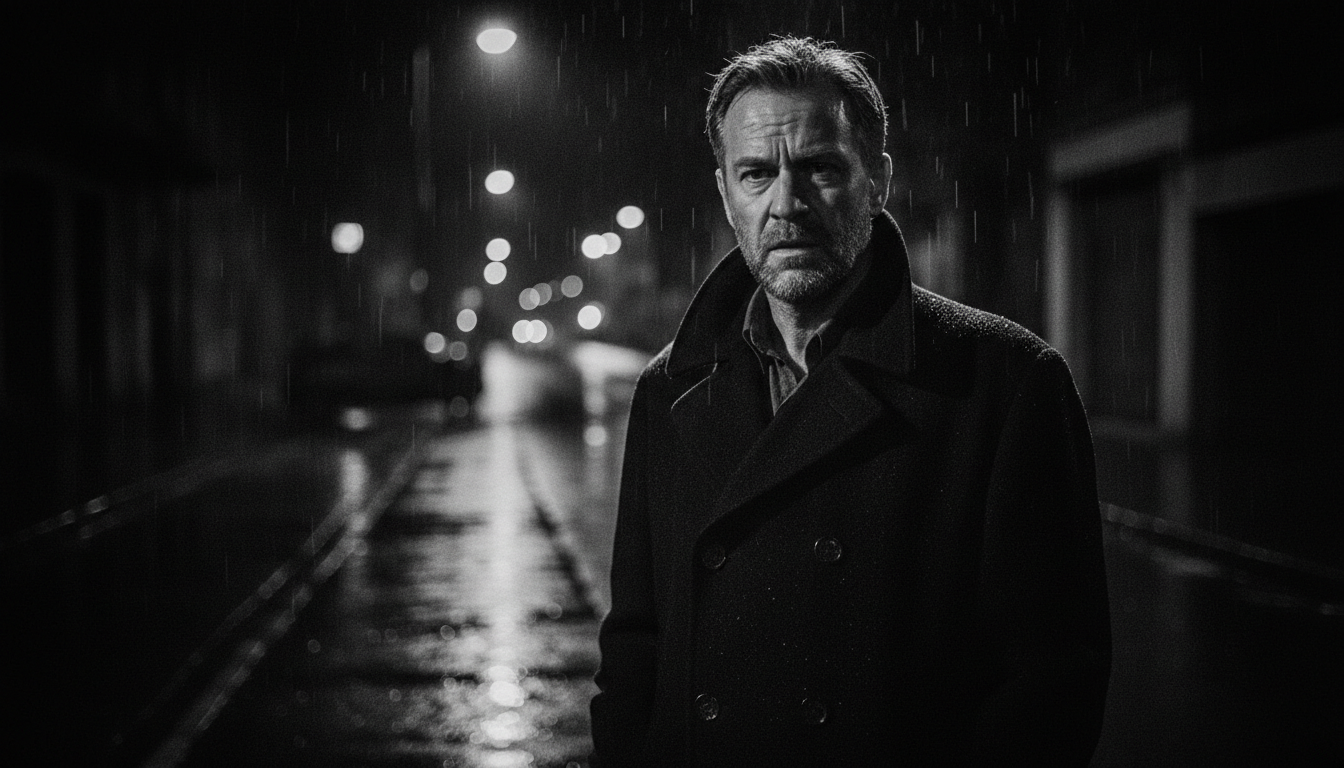
確認ポイント:
- フィルム・ノワール特有の高コントラストな明暗が表現されているか
- 単一の街灯からの低照度照明になっているか
- 雨に濡れた路面と水たまりの反射が描かれているか
- フィルムグレイン(粒子感)がヴィンテージ感を出しているか
- ほぼモノクロームの彩度低下した色調になっているか
2-3. 既存写真の変換(参照画像使用)
自分の写真をプロフェッショナルなヘッドショットに変換します。
Step 1: 変換したい写真を準備(selfie.jpg)
Step 2: プロンプトを作成
プロンプトの意図:
| 要素 | 記述 | 意図 |
|---|---|---|
| アイデンティティ | Maintain exact facial features and identity | 顔の特徴を維持 |
| 背景 | Softly blurred office with large windows | ぼかしたオフィス背景 |
| 照明 | Soft daylight from the front | 柔らかい自然光 |
| 服装 | Adjust to professional attire if needed | 必要に応じてビジネス服装に調整 |
| スタイル | subtle retouching, no heavy filters | 自然なレタッチ、フィルターなし |
Transform this photo into a professional LinkedIn headshot.

Requirements:
- Maintain exact facial features and identity from the input image
- Background: Softly blurred office with large windows
- Lighting: Soft daylight from the front
- Style: Clean, realistic, subtle retouching, no heavy filters
- Adjust to professional attire if needed (navy blazer, white shirt)

Keep the person's natural appearance while enhancing professionalism.
The result should look like a photo taken by a professional photographer.
クリックしてPythonコマンドを生成
生成例:
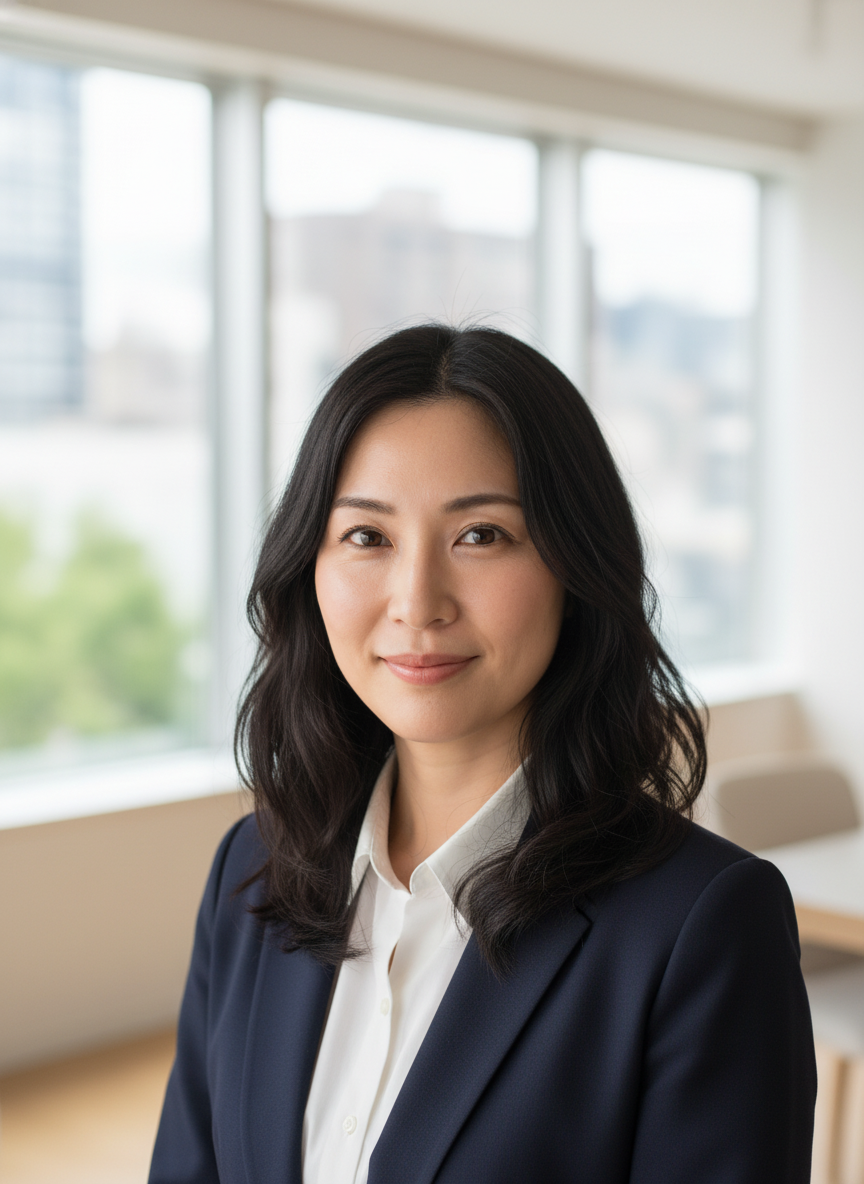
確認ポイント:
- 顔の特徴とアイデンティティが元の写真と一致しているか
- 背景が柔らかくぼけたオフィス(大きな窓)になっているか
- 柔らかい正面からの自然光になっているか
- フィルターではなく自然なレタッチに見えるか
- 服装がビジネス向け(紺ブレザー、白シャツ)に調整されているか
2-4. 詳細なポートレートプロンプト構造
ポートレート生成時に使用できるテンプレート構造です。
テンプレート:
[Subject Identity]:
A photorealistic [age]-year-old [ethnicity] [gender]
with [hair description], [eye color], and [expression].

[Physical Details]:
[Skin details: freckles, pores, subtle wrinkles].
[Any distinguishing features].

[Attire]:
Wearing [detailed clothing description].

[Lighting Setup]:
[Lighting type] from [direction].
[Secondary lights if any].

[Technical Specifications]:
Shot with [lens], [aperture].
[Depth of field description].

[Background]:
[Background description].

[Style Modifiers]:
[Style keywords].
テンプレート変数の説明:
| 変数 | 説明 | 記入例 |
|---|---|---|
[age] | 年齢 | 25, 40, 60 |
[ethnicity] | 人種・民族 | Japanese, European, African |
[gender] | 性別 | male, female, person |
[hair description] | 髪の描写 | short black hair, long wavy auburn hair |
[eye color] | 目の色 | warm brown eyes, piercing blue eyes |
[expression] | 表情 | a confident smile, a thoughtful gaze |
[Skin details] | 肌の詳細 | natural skin texture, visible pores |
[Attire] | 服装 | a navy suit with white shirt |
[Lighting type] | 照明の種類 | soft diffused, dramatic side |
[direction] | 光の方向 | the left, above, front |
[lens] | レンズ | 85mm portrait lens, 50mm |
[aperture] | 絞り値 | f/2.8, f/1.4 |
[Background] | 背景 | neutral gray gradient, blurred office |
[Style keywords] | スタイル | ultra-realistic, hyper-detailed |
チェックポイント
- プロフェッショナルヘッドショットを生成した
- シネマティックポートレートを試した
セクション3: テキスト制御
3-1. テキストレンダリングの特徴
Nanobananaは他のAI画像生成モデルと比較して、テキストレンダリングに優れています。
できること:
- 高忠実度テキストレンダリング(複数言語対応)
- ロゴ、ダイアグラム、ポスター向けのテキスト配置
- フォントスタイル、色、配置の指定
制限事項:
- 小さいフォントや凝縮スタイルは問題が起きやすい
- 長文テキストは不安定
- カーニング(字間)が一貫しないことがある
- 複雑なタイポグラフィは反復が必要
3-2. Quote-Lock プロトコル
100%のスペル精度のためのルール:
レンダリングするテキストは必ず 二重引用符 " " で囲む。
❌ Bad: Make a sign that says open for business.
✅ Good: Create a neon sign with the exact text "OPEN FOR BUSINESS".
3-3. タイポグラフィ指定
テキストを含むバナーを生成します。
プロンプトの意図:
| 要素 | 記述 | 意図 |
|---|---|---|
| ヘッドライン | "SUMMER SALE" in Bold Sans-Serif | Quote-Lockで囲んだメインテキスト |
| フォント | resembling Helvetica or Futura | サンセリフ体の具体的参照 |
| 色指定 | Pure White (#FFFFFF) | 正確なカラーコード |
| 位置 | centered in upper third | 上部1/3に中央配置 |
| サブテキスト | "Up to 50% Off" | 控えめなサイズのサポートテキスト |
| CTAボタン | "Shop Now" on orange rectangle | アクションを促すボタン |
| 背景 | Gradient from coral pink to warm orange | グラデーション背景 |
Create a promotional banner with the following text:

Typography Specifications:
- Main Headline: "SUMMER SALE"
  - Font Style: Bold Sans-Serif (resembling Helvetica or Futura)
  - Color: Pure White (#FFFFFF)
  - Size: Largest element, centered in upper third
  - Effect: Slight outer glow for visibility

- Subtext: "Up to 50% Off"
  - Font Style: Light weight sans-serif
  - Color: White with slight transparency
  - Position: Directly below headline
  - Size: 50% of headline size

- CTA Button: "Shop Now"
  - Font: Bold sans-serif
  - Color: White text on orange (#FF6B35) rectangle
  - Position: Bottom right corner
  - Effect: Subtle drop shadow

Visual Elements:
- Background: Gradient from coral pink to warm orange
- Subtle tropical leaf silhouettes on edges
- Clean, modern aesthetic with plenty of white space

Aspect ratio: 16:9 for website banner.
Priority: Text clarity and readability.
クリックしてPythonコマンドを生成
生成例:

確認ポイント:
- 「SUMMER SALE」が正確にスペルされているか
- テキストが上部1/3中央に配置されているか
- 「Up to 50% Off」がヘッドラインの50%サイズで下に配置されているか
- 「Shop Now」ボタンが右下にオレンジ背景で表示されているか
- コーラルピンクからオレンジのグラデーション背景になっているか
3-4. 日本語テキストの扱い
日本語(漢字)を含むロゴを生成します。
プロンプトの意図:
| 要素 | 記述 | 意図 |
|---|---|---|
| メインテキスト | "麺道場" | 日本語漢字3文字 |
| フォントスタイル | Japanese brush calligraphy style (Shodo) | 書道風の筆文字 |
| 精度要求 | All three kanji characters must be accurately rendered | 漢字の正確性を強調 |
| サブテキスト | "MENDOJO" | ローマ字での補足 |
| デザイン | Circular badge/stamp design (hanko style) | 印鑑風の円形バッジ |
| 色 | Deep red, black, and cream | 日本風の色合い |
| 品質保証 | No gibberish or malformed characters | 文字化け防止の明示 |
Create a logo design for a Japanese ramen shop called "麺道場".

Text Requirements:
- Main text: "麺道場" in bold, traditional Japanese brush calligraphy style (Shodo)
- All three kanji characters must be accurately rendered
- Subtext: "MENDOJO" in small, clean sans-serif below

Visual Design:
- Circular badge/stamp design (hanko style)
- Steam rising motif incorporated subtly
- Color palette: Deep red, black, and cream
- Vintage Japanese aesthetic with modern clarity

The kanji must be perfectly legible and correctly formed.
No gibberish or malformed characters.
クリックしてPythonコマンドを生成
生成例:
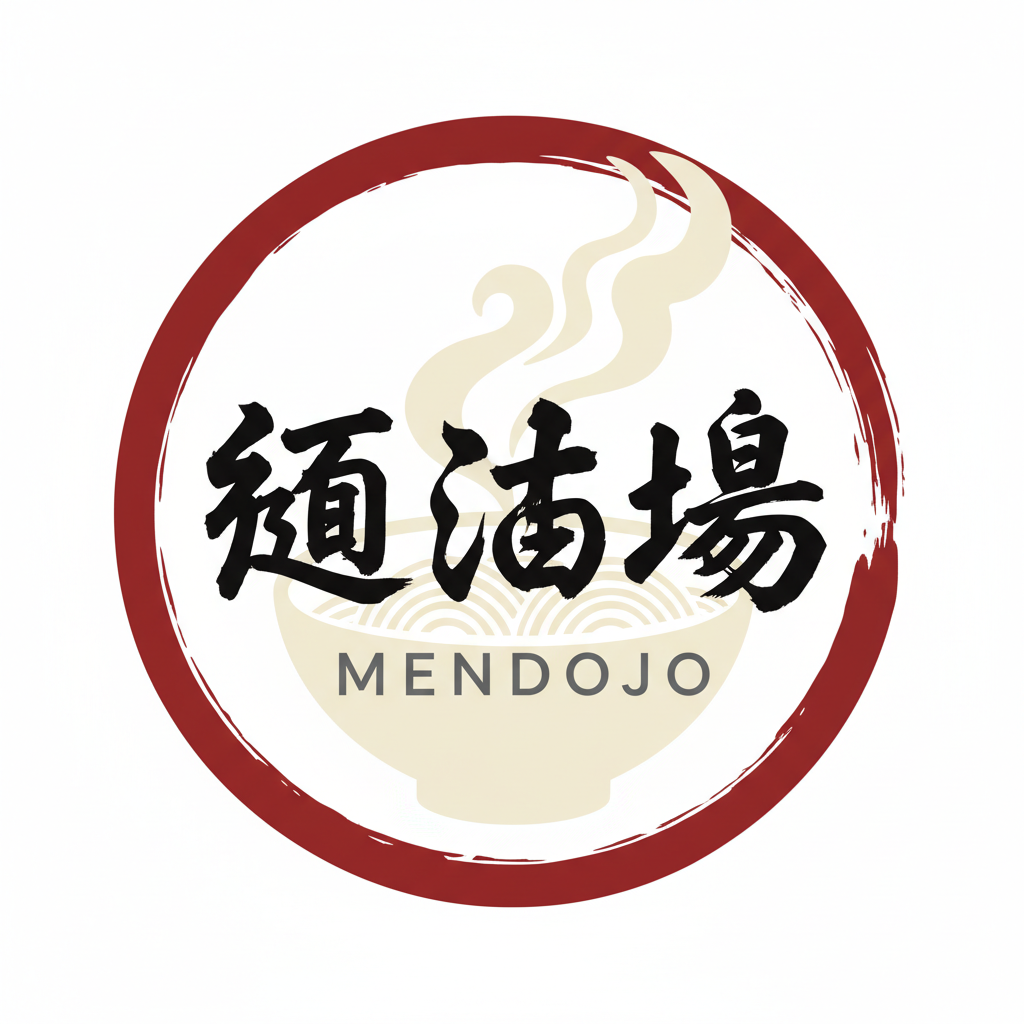
確認ポイント:
- 「麺道場」の3文字が正確に描かれているか(文字化けがないか)
- 書道風の力強い筆遣いになっているか
- 「MENDOJO」が下に小さく配置されているか
- 円形の印鑑風デザインになっているか
- 深い赤、黒、クリームの色パレットになっているか
注意: 日本語テキスト(特に複雑な漢字)はAI生成の精度が低下することがあります。重要なテキストは画像編集ソフトで後から追加することを検討してください。
3-5. テキストトラブルシューティング
文字化けが起きた場合:
- テキスト密度を減らす: 1つの視覚要素につき3-5語に制限
- 解像度を上げる: より大きなサイズを指定
- 単語全体を再指定: 1文字だけ間違っている場合でも、単語全体を再生成
# 文字化け対策プロンプト
prompt = """
Create an image with the text "CAFÉ" prominently displayed.

Text Specifications:
- The word "CAFÉ" in large, clear sans-serif font
- Include the accent on the 'E' (é with acute accent)
- Position: Top-left corner of image
- Size: Large, at least 1/4 of image width
- Color: Dark brown on light background

IMPORTANT: Render the text accurately with no misspellings.
The accent mark on the E is required.
No other text should appear in the image.
"""
チェックポイント
- Quote-Lockプロトコルを理解した
- 日本語テキストを含む画像を生成した
セクション4: 背景変更・置換
4-1. シンプルな背景変更
既存画像の背景をスタジオ背景に変更します。
Step 1: 変更したい画像を準備(original_photo.jpg)
Step 2: プロンプトを作成
プロンプトの意図:
| 要素 | 記述 | 意図 |
|---|---|---|
| 新背景 | Softly lit neutral gray gradient | 柔らかく照らされた灰色グラデーション |
| 被写体保持 | Keep the subject completely unchanged | 被写体を一切変更しない |
| プロポーション | Maintain original proportions and lighting direction | 元の比率と光の方向を維持 |
| エッジ処理 | Natural edge blending, no visible cutout artifacts | 自然なブレンド、切り抜き痕なし |
Replace the background of this image with a professional studio setting.

Requirements:
- New background: Softly lit neutral gray gradient
- Keep the subject (person/object) completely unchanged
- Maintain original proportions and lighting direction on subject
- Natural edge blending, no visible cutout artifacts
- Professional studio photography aesthetic
クリックしてPythonコマンドを生成
生成例:
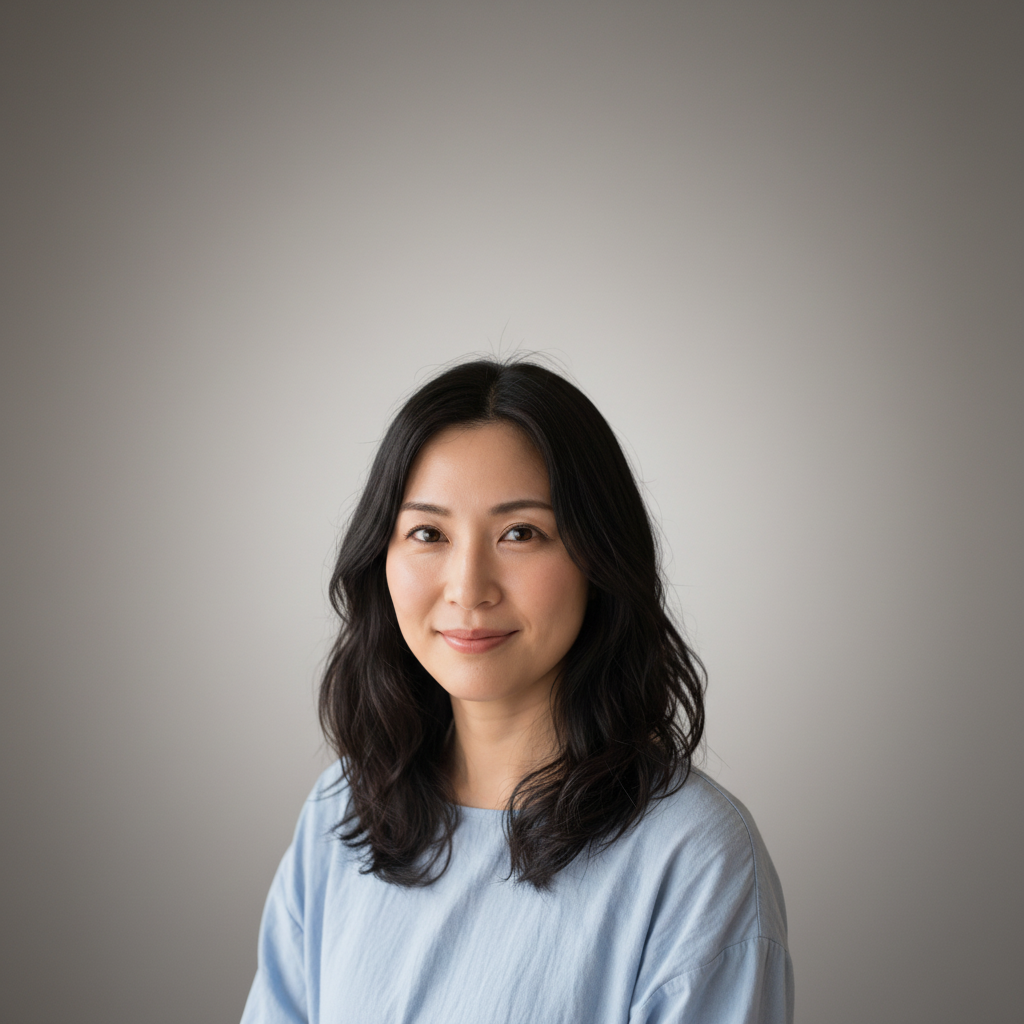
確認ポイント:
- 被写体(人物/オブジェクト)が元画像と完全に同じか
- 背景が柔らかく照らされた中性的なグレーのグラデーションになっているか
- エッジが自然にブレンドされ、切り抜き痕がないか
- 被写体の照明方向と比率が維持されているか
4-2. 環境変更(季節)
夏の写真を冬の風景に変換します。
プロンプトの意図:
| カテゴリ | 記述 | 意図 |
|---|---|---|
| 風景変更 | Convert the green landscape to snow-covered scenery | 緑を雪景色に変換 |
| エフェクト | Add falling snowflakes in the foreground | 前景に雪の降る効果 |
| 照明調整 | cool, overcast winter tones | 冬の曇り空の色調 |
| 質感追加 | Add frost or snow on surfaces | 霜や雪を追加 |
| 被写体保持 | The main subject exactly as they are | 人物は変更しない |
| オプション | visible breath mist | 白い息を追加 |
Transform this image into a winter setting.

Changes:
- Convert the green landscape to snow-covered scenery
- Add falling snowflakes in the foreground (subtle, not overwhelming)
- Adjust the lighting to cool, overcast winter tones
- Add frost or snow on surfaces visible in the image

Keep Unchanged:
- The main subject (person) exactly as they are
- Facial features, expression, pose
- Clothing (unless it would look unnatural in winter)

Optional Enhancements:
- Add visible breath mist if appropriate
- Apply cool color grading to the overall image
クリックしてPythonコマンドを生成
生成例:
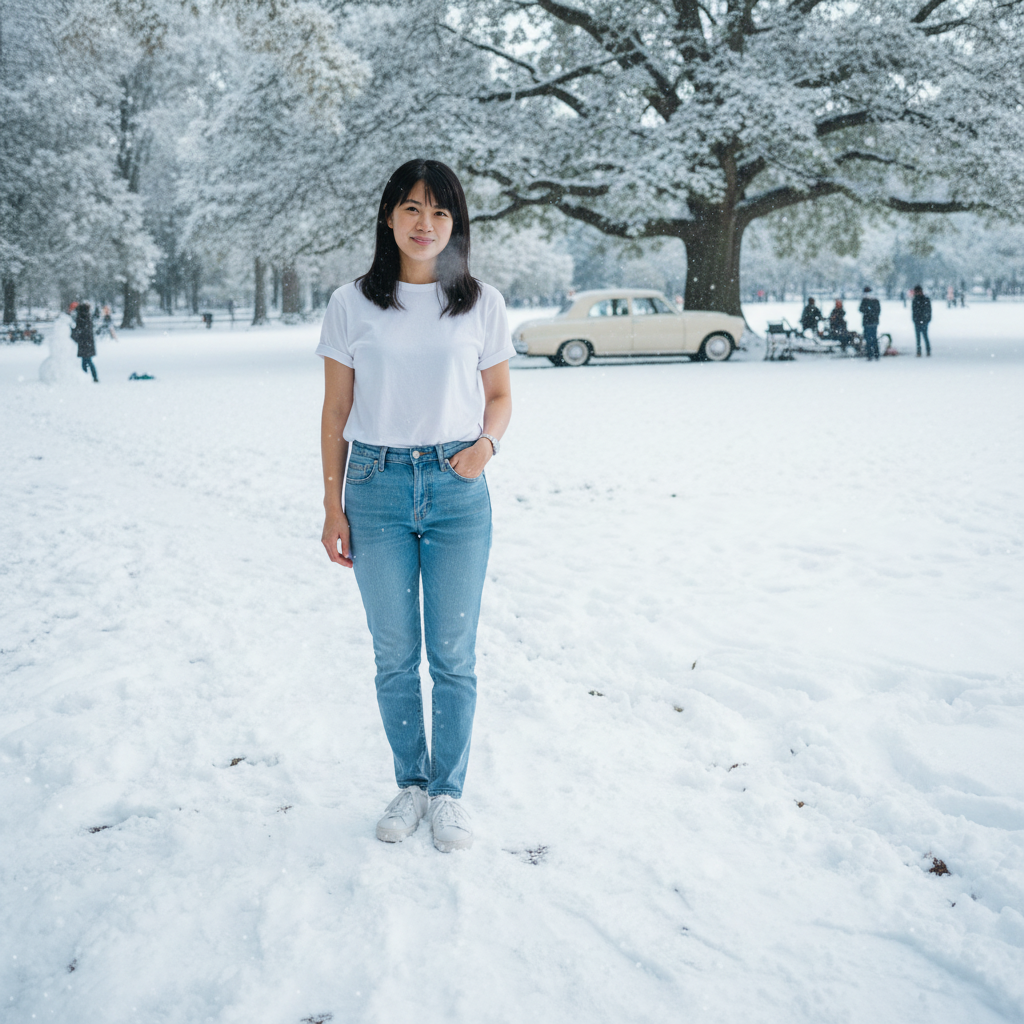
確認ポイント:
- 緑の風景が雪に覆われた景色に変換されているか
- 前景に控えめな雪の粒が降っているか
- 人物(顔の特徴、表情、ポーズ)が変わっていないか
- 照明が冬の曇り空の色調(寒色系)になっているか
- 白い息のような効果が追加されているか(オプション)
4-3. ファンタジー背景
ポートレートの背景を幻想的な風景に変更します。
プロンプトの意図:
| カテゴリ | 記述 | 意図 |
|---|---|---|
| 環境 | Floating islands with cascading waterfalls | 滝のある浮遊島 |
| 空 | Purple and pink twilight sky with two moons | 紫とピンクの黄昏空、月2つ |
| エフェクト | Magical particle effects (sparkles, floating lights) | 魔法の粒子効果 |
| 照明統合 | Apply dramatic rim lighting matching the new scene | 新シーンに合わせたリムライト |
| エッジ効果 | subtle magical glow around the subject's edges | 被写体の輪郭に魔法の輝き |
| 統合 | Seamless integration with fantasy lighting | ファンタジー照明との統合 |
Replace the background with a magical fantasy setting.

New Environment:
- Floating islands with cascading waterfalls
- Purple and pink twilight sky with two moons
- Magical particle effects (sparkles, floating lights)
- Ethereal mist in the distance

Integration:
- Apply dramatic rim lighting on the subject matching the new scene
- Add subtle magical glow around the subject's edges
- Maintain the subject's original pose and expression
- Seamless integration with fantasy lighting

The subject should look like they truly belong in this magical world.
クリックしてPythonコマンドを生成
生成例:
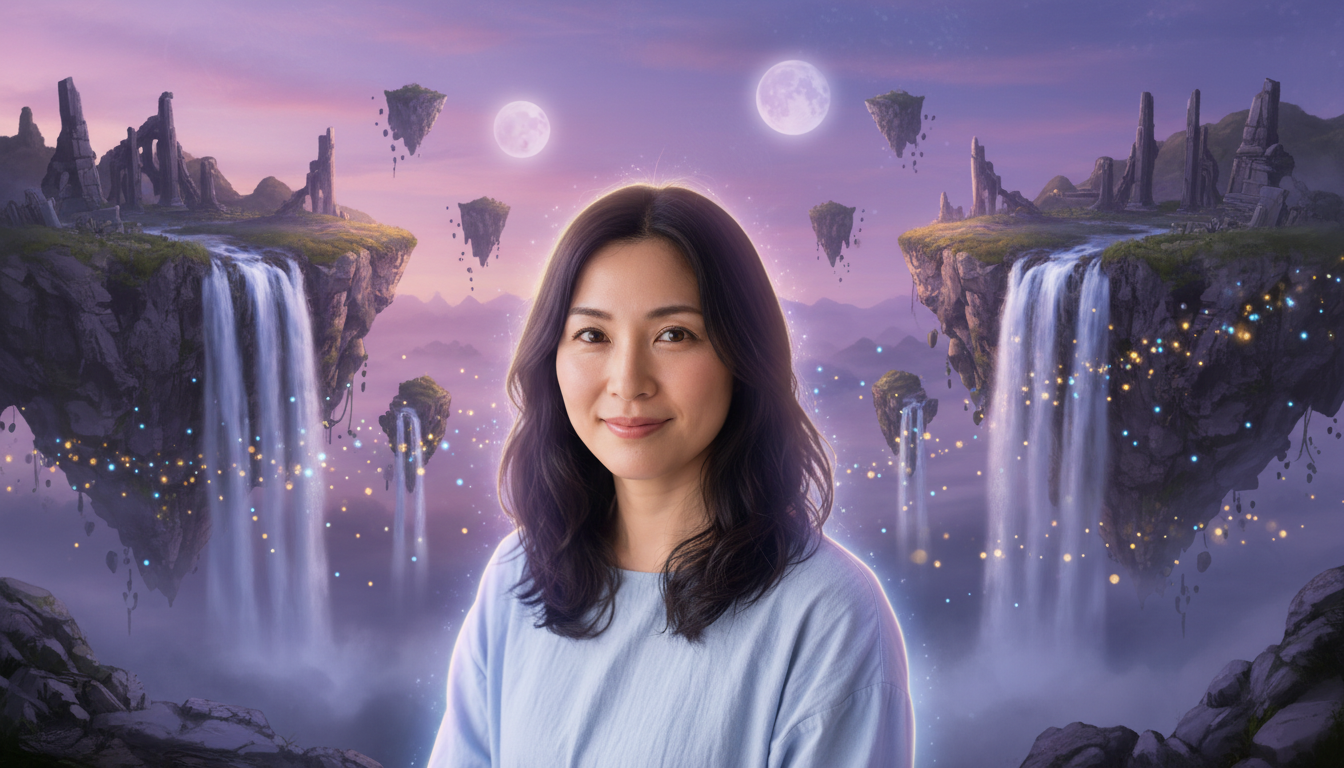
確認ポイント:
- 滝のある浮遊島が描かれているか
- 紫とピンクの黄昏空に月が2つ見えるか
- 魔法の粒子効果(きらめき、浮遊する光)があるか
- 被写体にドラマチックなリムライトが適用されているか
- 被写体の輪郭に魔法的な輝きがあるか
- 元のポーズと表情が維持されているか
4-4. 背景のみを指定して新規生成
背景を詳細に指定して、新規に画像を生成します(参照画像なし)。
プロンプトの意図:
| カテゴリ | 記述 | 意図 |
|---|---|---|
| 被写体 | young Japanese businessman | 若いビジネスマン |
| 環境 | Floor-to-ceiling windows overlooking Tokyo skyline | 東京のスカイラインが見える窓 |
| 家具 | Modern minimalist office furniture | モダンミニマルな家具 |
| 照明 | Afternoon sunlight streaming through windows | 窓から差し込む午後の光 |
| ランドマーク | Tokyo Tower visible in the distant background | 遠景に東京タワー |
| ショットタイプ | Wide shot showing the environment | 環境を見せるワイドショット |
A young Japanese businessman in a modern Tokyo office.

Environment Details:
- Floor-to-ceiling windows overlooking Tokyo skyline
- Modern minimalist office furniture
- Afternoon sunlight streaming through windows
- Tokyo Tower visible in the distant background

The person:
- Standing near the window, looking at the view
- Professional navy suit
- Contemplative expression

Technical:
- Wide shot showing the environment
- Natural office lighting with window light
- 16:9 cinematic aspect ratio
クリックしてPythonコマンドを生成
生成例:
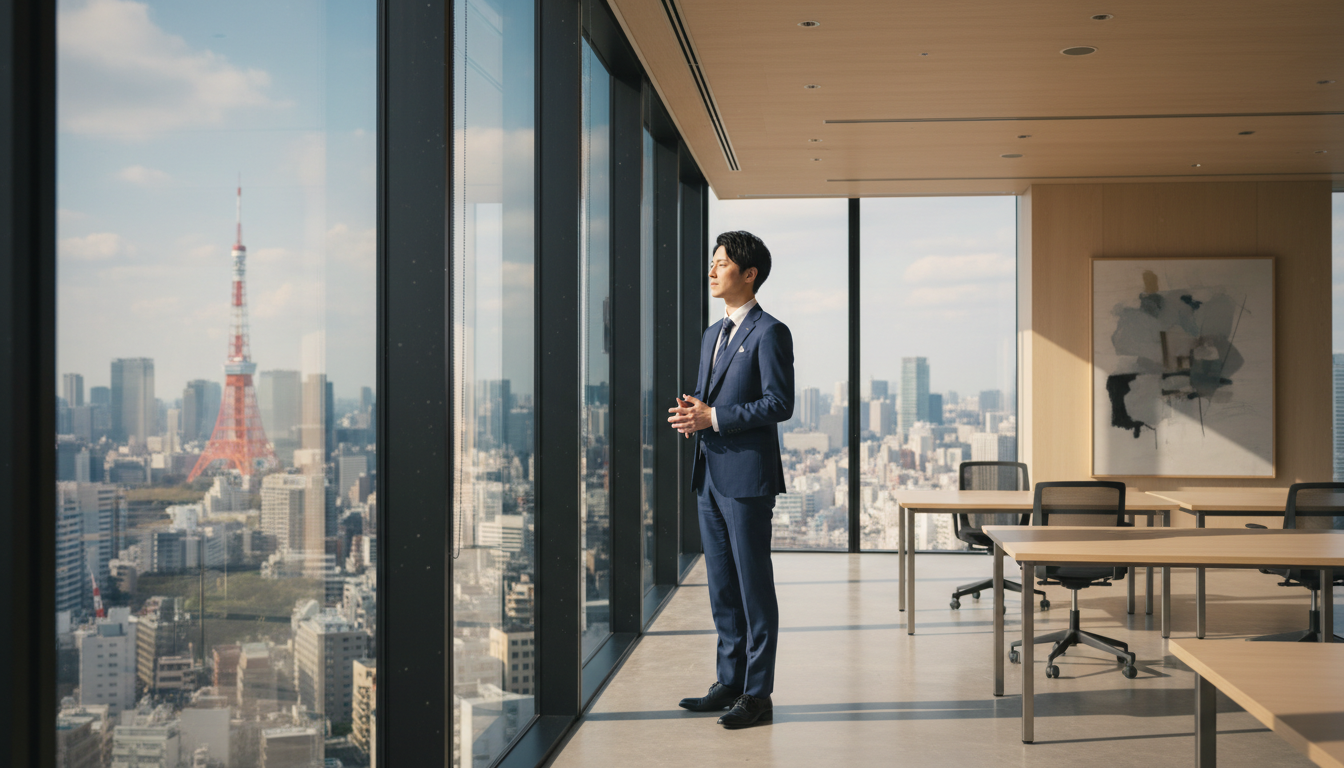
確認ポイント:
- 床から天井までの窓と東京のスカイラインが見えるか
- モダンでミニマルなオフィス家具が配置されているか
- 窓から差し込む午後の光が表現されているか
- 遠景に東京タワーが見えるか
- 紺のスーツを着た若いビジネスマンが窓の近くに立っているか
- ワイドショットで環境が見せられているか
チェックポイント
- 既存画像の背景を変更した
- 季節変更を試した
セクション5: 部分編集(Inpainting)
5-1. 自然言語ベースの編集
Nanobananaでは、マスクなしで自然言語で編集指示を出せます。
服の色変更の例:
プロンプトの意図:
| 要素 | 記述 | 意図 |
|---|---|---|
| 変更対象 | change only the jacket color | ジャケットの色のみ変更 |
| 色の変更 | from black to burgundy red | 黒からバーガンディレッドへ |
| 質感保持 | Same fabric texture and material appearance | 素材の質感を維持 |
| 照明保持 | Same lighting and shadows on the jacket | 光と影を維持 |
| 背景保持 | Same background, no changes | 背景は変更しない |
| 人物保持 | Same person's face, hair, and expression | 人物は変更しない |
Using this image, change only the jacket color from black to burgundy red.

Keep everything else exactly the same:
- Same fabric texture and material appearance
- Same lighting and shadows on the jacket
- Same background, no changes
- Same person's face, hair, and expression
- Same fit and style of the jacket

Only the color should change from black to deep burgundy red.
クリックしてPythonコマンドを生成
生成例:
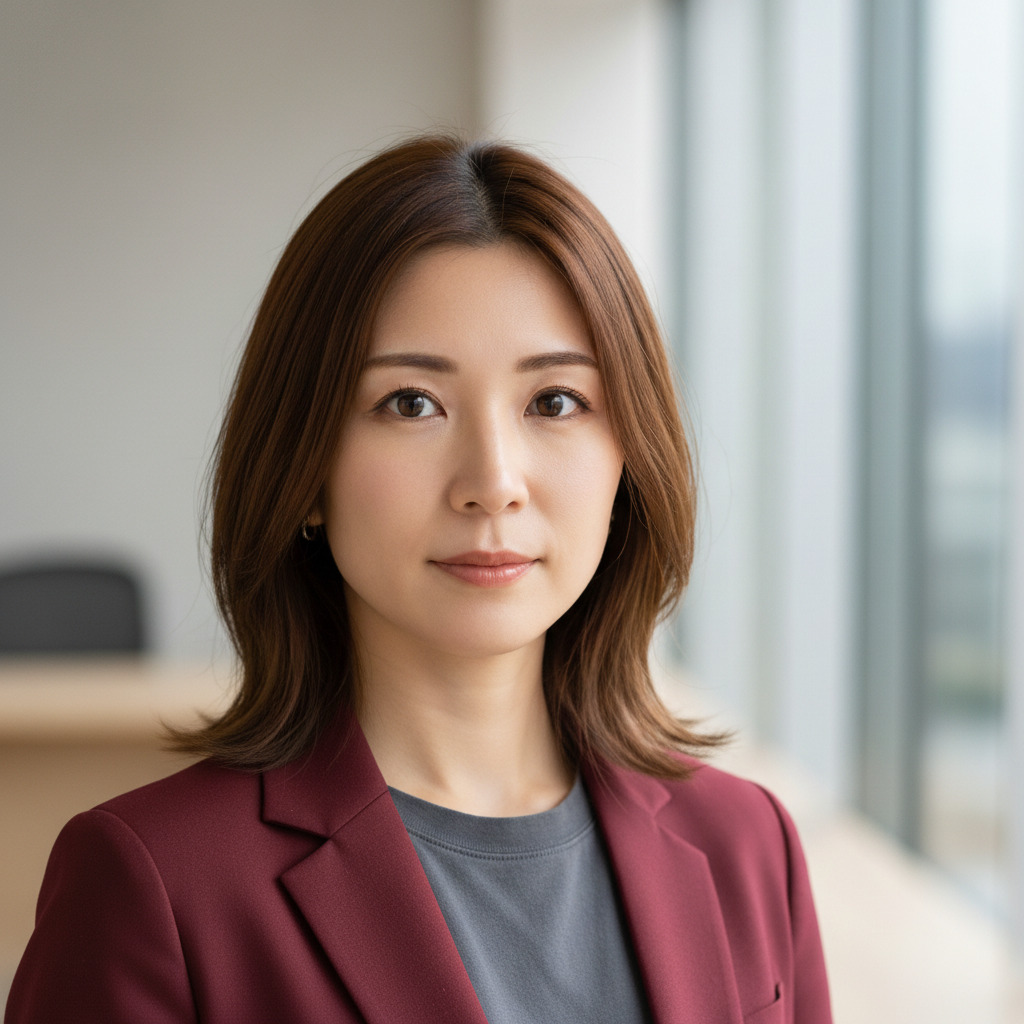
確認ポイント:
- ジャケットの色が黒からバーガンディレッドに変わっているか
- 素材の質感とフィット感が維持されているか
- ジャケットの光と影が元画像と一致しているか
- 背景、人物の顔、髪、表情が変わっていないか
- ジャケットのスタイル(形、ボタン)が維持されているか
5-2. オブジェクト削除
背景に写っている不要なオブジェクトを削除します。
プロンプトの意図:
| 要素 | 記述 | 意図 |
|---|---|---|
| 削除対象 | Remove the car visible in the background | 背景の車を削除 |
| 補完方法 | Fill the area naturally with surrounding environment | 周囲の環境で自然に埋める |
| 質感維持 | Maintain consistent lighting and texture | 照明とテクスチャを維持 |
| 被写体保持 | Keep the main subject completely unchanged | 前景の人物は変更しない |
| 品質 | Seamless blend with no visible editing artifacts | 編集の痕跡なし |
Remove the car visible in the background of this image.

Requirements:
- Fill the area naturally with the surrounding environment
- Extend the street/sidewalk/landscape where the car was
- Maintain consistent lighting and texture
- Keep the main subject (person in foreground) completely unchanged
- Seamless blend with no visible editing artifacts

The result should look like the car was never there.
クリックしてPythonコマンドを生成
生成例:
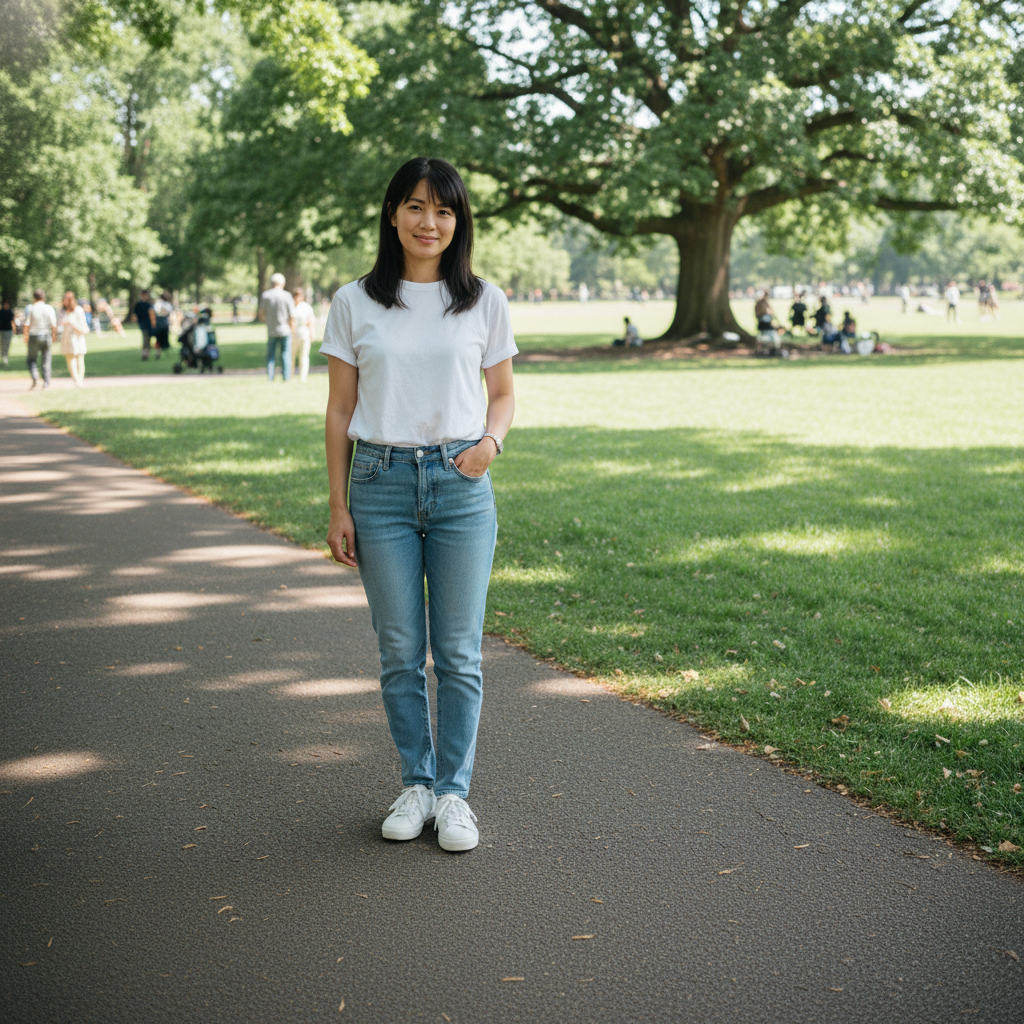
確認ポイント:
- 車があった場所が周囲の環境で自然に埋められているか
- 道路/歩道/風景のテクスチャと照明が一貫しているか
- 前景の人物が完全に変わっていないか
- シームレスにブレンドされ、編集の痕跡がないか
- 車が元からなかったかのように見えるか
5-3. オブジェクト追加
顔にメガネを追加します。
プロンプトの意図:
| 要素 | 記述 | 意図 |
|---|---|---|
| フレーム | Modern rectangular frames, thin black plastic | モダンな細い黒縁メガネ |
| 配置 | Position naturally on the nose bridge | 鼻筋に自然に配置 |
| 反射 | Add appropriate reflections matching the lighting | 照明に合わせた反射 |
| 影 | Add subtle shadows under the frames | フレームの下に自然な影 |
| 保持 | Keep all other facial features exactly the same | 他の顔の特徴は維持 |
Add stylish black-framed glasses to this person's face.

Requirements:
- Modern rectangular frames, thin black plastic
- Position naturally on the nose bridge
- Add appropriate reflections matching the lighting in the image
- Add subtle shadows under the frames
- Match the lighting direction of the original image
- Keep all other facial features exactly the same

The glasses should look natural, as if they were worn when the photo was taken.
クリックしてPythonコマンドを生成
生成例:
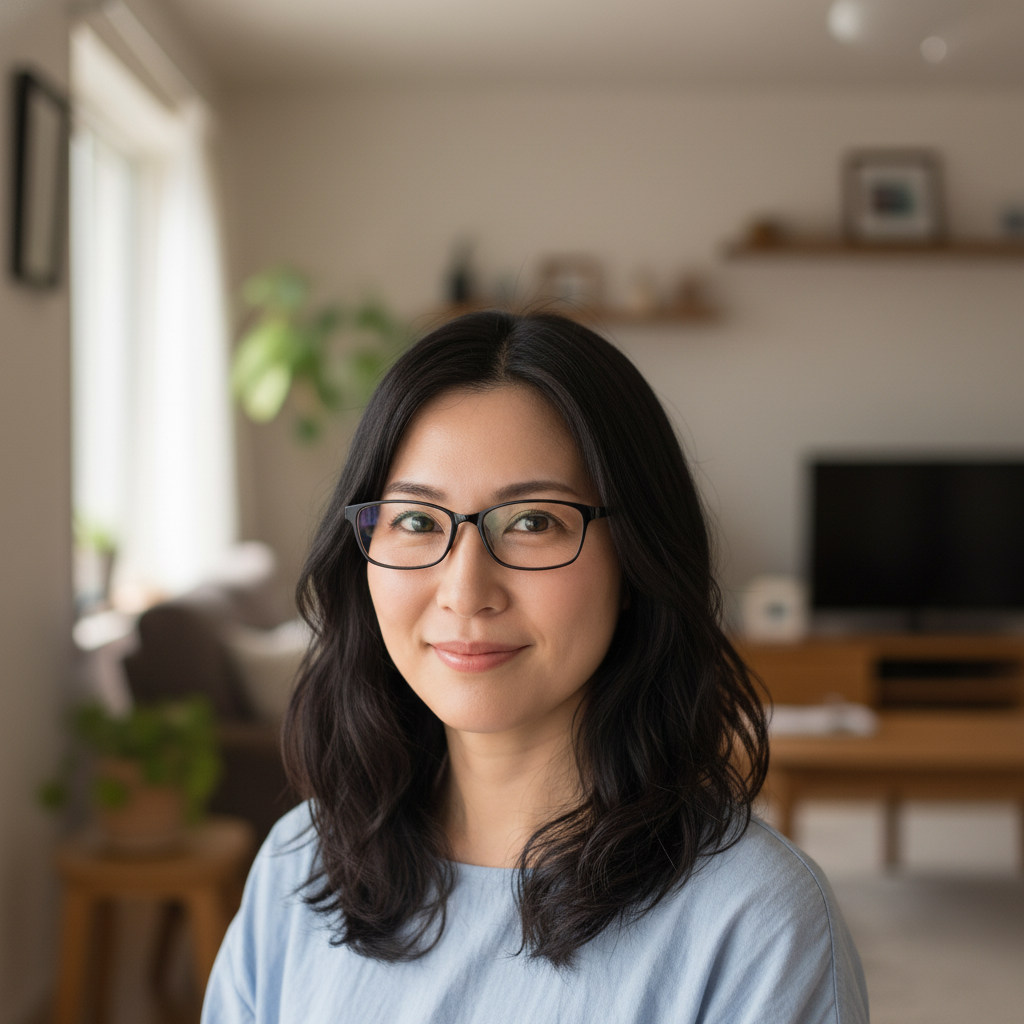
確認ポイント:
- メガネが鼻筋に自然に配置されているか
- フレームに照明に合った反射があるか
- フレームの下に自然な影があるか
- 顔の他の部分(目、眉、肌)が変わっていないか
5-4. 表情変更
無表情を自然な笑顔に変更します。
プロンプトの意図:
| 要素 | 記述 | 意図 |
|---|---|---|
| 笑顔 | Natural, warm smile (not exaggerated) | 自然で暖かい(大げさでない)笑顔 |
| 真正性 | Slight crow's feet at the corners of the eyes | 本物の笑顔の証拠である目尻のシワ |
| 表情 | Relaxed, happy expression | リラックスした幸せな表情 |
| 保持 | Maintain exact facial structure and identity | 顔の構造とアイデンティティを維持 |
Change the person's expression from neutral to a warm, genuine smile.

Requirements:
- Natural, warm smile (not exaggerated)
- Slight crow's feet at the corners of the eyes (genuine smile indicator)
- Relaxed, happy expression
- Maintain exact facial structure and identity
- Keep lighting, background, and clothing unchanged

The smile should look natural and not artificial or forced.
クリックしてPythonコマンドを生成
生成例:
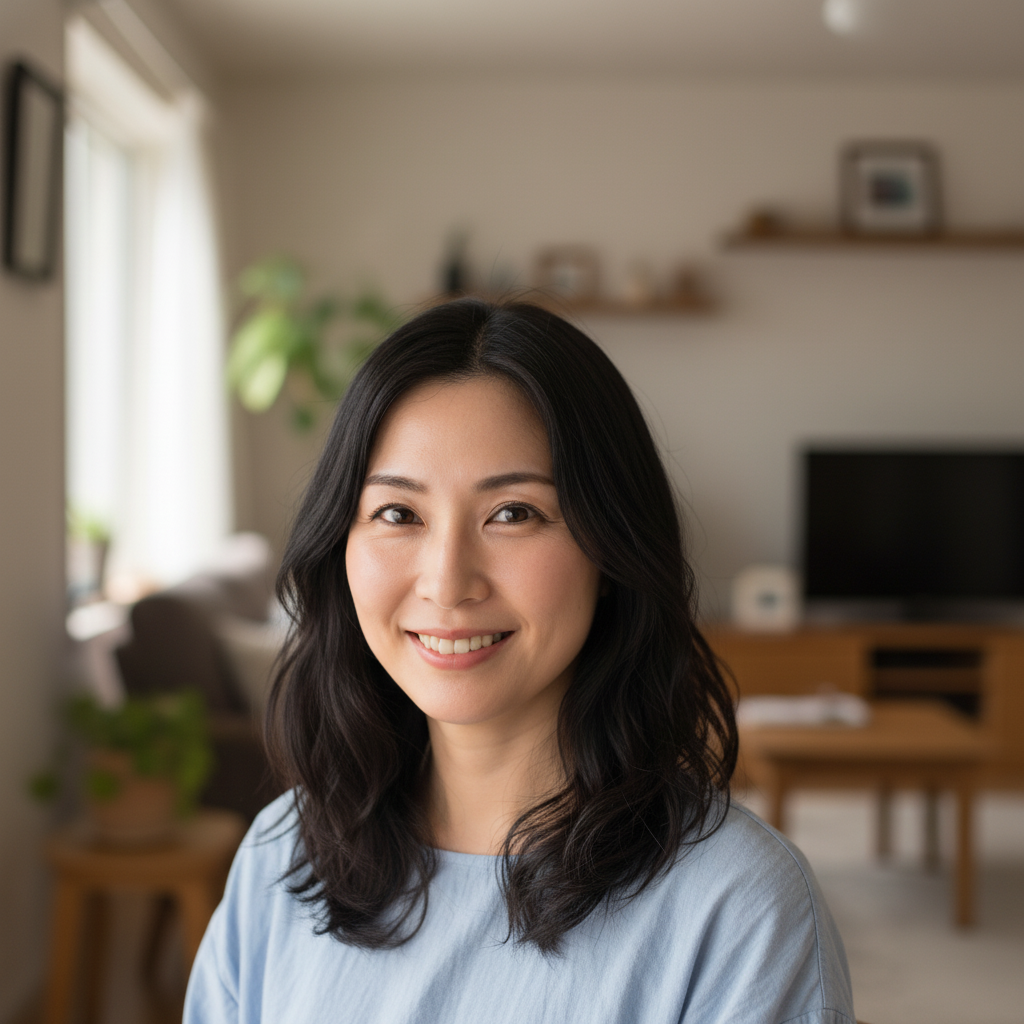
確認ポイント:
- 自然で暖かい笑顔になっているか(大げさでないか)
- 目尻に自然なシワ(本物の笑顔の証拠)があるか
- 顔の構造とアイデンティティが維持されているか
- 照明、背景、服装が変わっていないか
5-5. 複合編集
髪色、メイク、服装を同時に変更します。
プロンプトの意図:
| 要素 | 記述 | 意図 |
|---|---|---|
| 髪色 | Change hair color from brown to platinum blonde | 茶色からプラチナブロンドへ |
| メイク | Add subtle professional makeup (natural look) | 控えめでプロフェッショナルなナチュラルメイク |
| 服装 | Replace casual t-shirt with white silk blouse | カジュアルTシャツを白いシルクブラウスに |
| 保持 | Keep unchanged: Facial features, Background, Lighting | 顔、背景、照明は維持 |
Make the following changes to this image:

1. Change the person's hair color from brown to platinum blonde
2. Add subtle professional makeup (natural look)
3. Replace the casual t-shirt with a white silk blouse

Keep unchanged:
- Facial features and structure
- Background
- Lighting direction
- Overall composition

Each change should look natural and professionally done.
クリックしてPythonコマンドを生成
生成例:
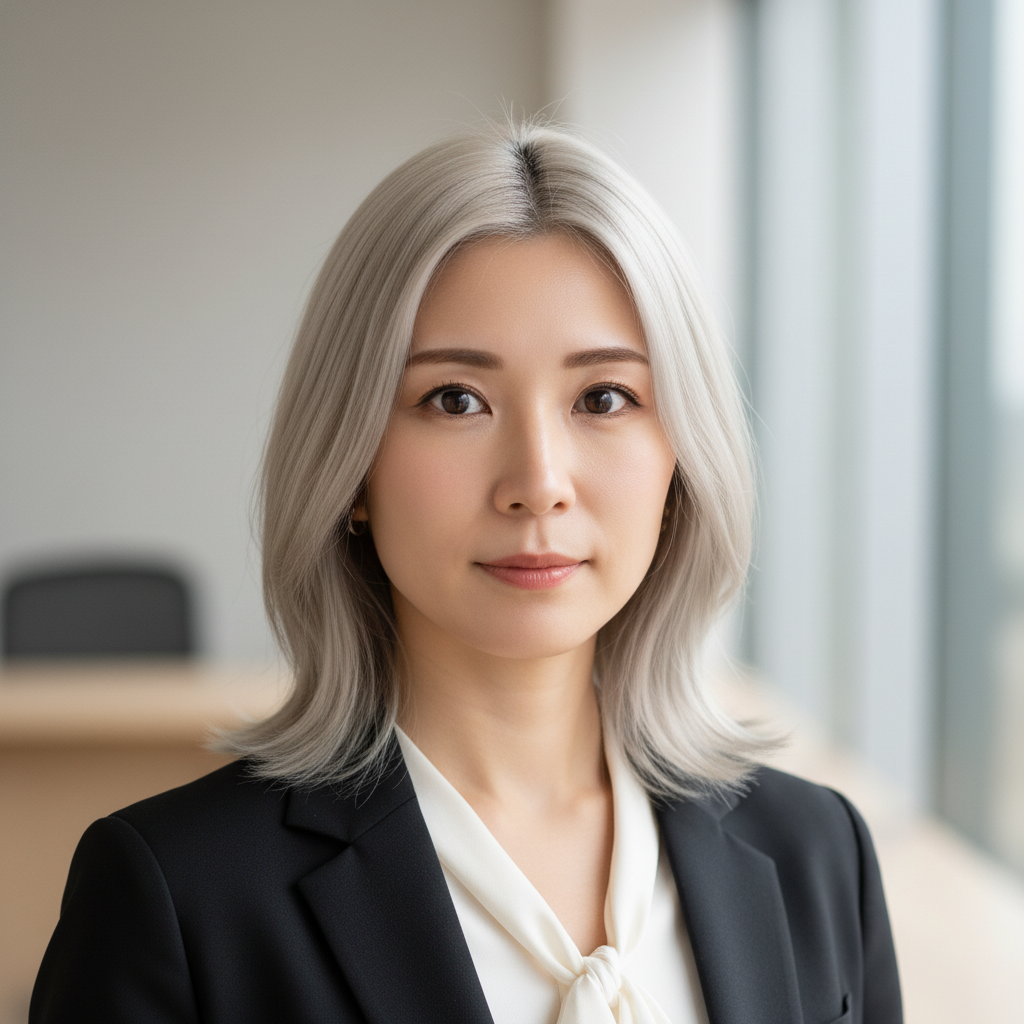
確認ポイント:
- 髪色がプラチナブロンドに変わっているか
- 控えめなプロフェッショナルなメイクが追加されているか
- 服装が白いシルクブラウスになっているか
- 顔の特徴と構造が維持されているか
- 背景、照明、構図が変わっていないか
5-6. 編集のベストプラクティス
1. 一度に1つの変更 複数の変更を同時に行うと、結果が不安定になります。
# Good: 1つずつ変更
Step 1: 髪の色を変更
Step 2: 服を変更
Step 3: 背景を変更
2. 保持する要素を明示 変更しない部分を明確に記述することで、意図しない変更を防ぎます。
Keep unchanged:
- Facial features
- Lighting
- Background
3. 具体的な指示 曖昧な指示は予期しない結果を招きます。
❌ Bad: Make it look better
✅ Good: Increase the contrast slightly and add a subtle warm tone
セクション5のチェックポイント
- 服の色を変更した
- オブジェクトを削除した
- オブジェクト(メガネなど)を追加した
- 表情を変更した
- 複合編集を試した
トラブルシューティング
人物生成がブロックされる
原因: セーフティフィルターが作動
解決策:
- 有名人の名前を使用していないか確認
- 未成年を示唆する表現を避ける
- プロンプトをより中立的な表現に変更
テキストが正しく表示されない
原因: テキストが小さい、または複雑すぎる
解決策:
- テキストサイズを大きく指定
- Quote-Lockプロトコルを使用
- シンプルなフォントを指定
- 1つの画像に含めるテキスト量を減らす
背景変更で被写体が変わってしまう
原因: 保持すべき要素の指定が不十分
解決策:
IMPORTANT: The person/subject must remain EXACTLY the same.
Do not change: face, expression, pose, clothing, body position.
Only change the background.
部分編集で周囲も変わる
原因: 編集範囲が曖昧
解決策:
- 編集する部分を具体的に限定
- 「only」「just」を強調
- 周囲を「keep unchanged」で明示
まとめ
このモジュールで学んだこと
- 実写人物生成: リアリズム向上のキーワードと制限事項
- プロフェッショナルポートレート: LinkedIn/シネマティック/参照画像変換
- テキスト制御: Quote-Lockプロトコルとタイポグラフィ指定
- 背景変更: スタジオ/季節/ファンタジー背景への変換
- 部分編集: 色変更、削除、追加、表情変更
編集チェックリスト
- Quote-Lockでテキストを囲んでいる
- 保持する要素を明示している
- 一度に1つの変更にしている
- 具体的な指示を出している
次のステップ
Module 08では、ビジネスコンテンツ(バナー、サムネイル、ロゴ、広告)の生成について学びます。
よくある質問
Q: 生成された人物画像にはウォーターマークが付きますか? A: はい。すべてのNanobanana生成画像には不可視のSynthIDウォーターマークが付与されます。これは削除できず、AI生成であることを検出可能にします。
Q: 自分の写真を元に編集した場合もウォーターマークが付きますか? A: はい。既存画像を編集した場合も、出力画像にはSynthIDが付与されます。
Q: テキストの日本語は英語より精度が低いですか? A: はい。英語のテキストレンダリングが最も精度が高く、日本語(特に複雑な漢字)は精度が下がることがあります。重要な日本語テキストは、画像編集ソフトで後から追加することを検討してください。
Q: 背景変更で人物の照明も自動調整されますか? A: 部分的に調整されますが、完璧ではありません。新しい背景の照明方向を明示し、「match the lighting to the new environment」と指示することで改善できます。
Q: 部分編集で失敗した場合、元画像に戻せますか? A: API経由での編集では元画像は変更されません。失敗した場合は、元画像から再度編集を試みてください。